Pinpoint a Bug Using Watches, Watchpoints, and Controlling Execution Flow
Navigating Through the Code With Execution Flow
Have you ever followed a recipe step by step? After each step, you usually pause until you're prepared to follow the next one. Sometimes you spot an opportunity to improvise and change the recipe, but for the most part, you follow along until you get a cake! 🍰
When you step through the lines of your program in a debugger, it's very much the same. You follow a prescribed recipe step by step. That recipe is your original code. However, as you step over and inspect each line in action, you can change it up a little, modify variables, and call instructions. Modifying variables as your program runs can help you test out theories and home in on your bug!
How can I control the execution of my program with such precision?
You use the debugger’s panel to control the flow of execution. Let's explore it in more detail and see the palette of options on offer. 🎨
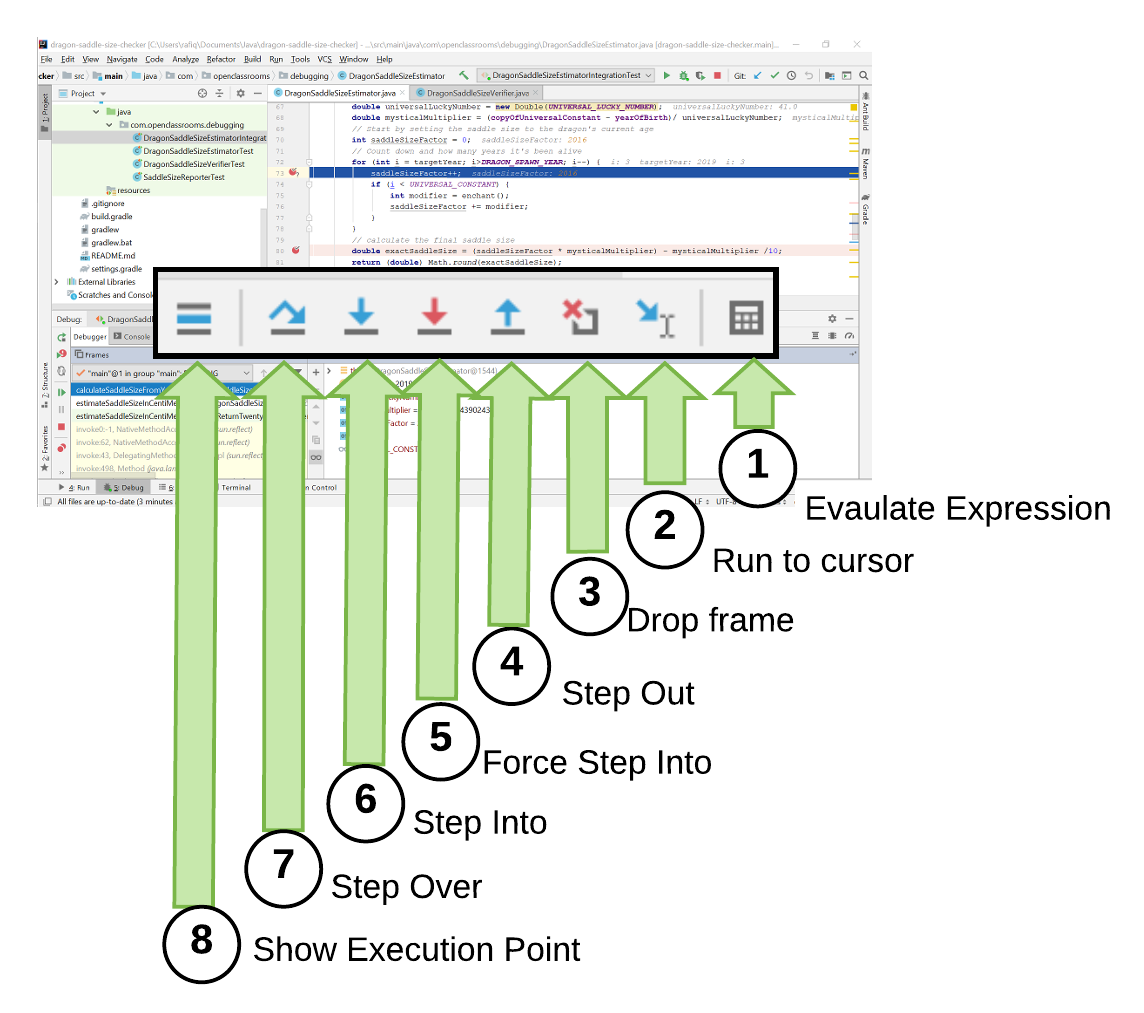
Let's break this down:
Evaluate Expression allows you to execute any arbitrary snippet of Java code from within the debugger, running as though it preceded your current breakpoint. You'll find this useful when you want to try out changes to your code at a breakpoint, as it doesn't edit the source.
Run To Cursor unsuspends the debugger and breaks at the line where your cursor currently is. This is like adding a breakpoint for the current line and hitting resume. When you're suspended at a breakpoint and reading your way through the code, this is a great way to yell "over here!" and have the debugger catch up with you. It avoids creating new breakpoints which you'll have to manage later!
Drop Frame rewinds your program to the point before the current method was called. It essentially resets the world to the previous item on your call stack. This gives you the power to time travel when you've stopped at a breakpoint and missed a detail, or decide you'd like to replay the incident after repositioning your evidence with Evaluate Expression.
Step Out resumes execution and goes back up to the caller to continue. If you're investigating a method and have finished exploring everything relevant to your investigation, this allows you to jump back to the caller and continue debugging from the point after the method has completed, saving you the inconvenience of stepping any further.
Force Step Into is like Step Into (below). It resumes execution and immediately suspends in a method that you do not normally get to debug such as Java's classes, constructors, getters, and setters. This lets you dive into the JDK itself. Usually, we trust Java and don't need to debug here. However, there are times when you might misunderstand the Javadoc or make a poor assumption about what a part of the framework does. This can be invaluable and teach you more about Java's core libraries.
Step Into resumes execution from a breakpoint on a method call. It suspends again on the first line of the method. This lets you move from a method call on a breakpoint, right into that method to investigate what it does, and how it handles the arguments you pass it.
Step Over resumes execution of the current breakpoint, and suspends again on the next statement in the current file. Once you're suspended on a particular line, this allows you to continue suspending on each following line. If it weren't for Step Over, your IDE would be full of breakpoints on every other line. You can use this to understand the flow of your code, step by step!
Show Execution Point returns the code editor to the current breakpoint. This can be handy if you start exploring your code and forgot where the debugger had stopped. It's very easy to get lost in your IDE when you're reading through a complex codebase! Think of it as a way to teleport 🕴️ back to the line of code you're suspended at!
We’re now going to use this control as the remote control for our time machine to better understand why we are getting a negative saddle size.
But can’t I just set up lots of breakpoints and hit resume?
While there is nothing to stop you from setting up breakpoints on every interesting line of a source file, it can be slow to set up and force you to unnecessarily inspect statements in your codebase. You might find yourself having to examine method calls and statements which have nothing to do with your bug. Ones you could easily avoid.
When you don't know the cause of a bug, it can be like exploring a new city. Using the execution flow controls lets you take a stroll through your code. Just like when you wander through a city, you'll stop when you see something interesting! 🚶🏿♂️This is usually your best bet if you're walking unfamiliar streets without a map.
Let’s see how we can use control flows to investigate our bug further.
Use Control Flows to Investigate a Bug
Our investigation has helped eliminate the following causes:
An issue with the date calculated when a date is not passed in.
A buggy modification to the date parameter.
An issue in the
DragonSaddleSizeVerifierclass throwing the exception.A condition in the for loop negatively adjusting the saddle size as it's calculated.
The latest piece of evidence we've seen is that the DragonSaddleSizeEstimator::calculateSaddleSizeFromYear method calculates a variable called mysticalMultiplier and gives it an odd negative value. When we use this value to calculate the saddle size, the resulting estimate is the same as the one seen in our buggy exception: -49.
🕵️♀️So, our next theory is that the mysticalMultiplier is calculated differently when a target date is passed from the command line, unlike where it's set explicitly in our test. Let's use our tools to understand how the mysticalMultiplier is calculated.
Well, that was interesting. Let's review the evidence:
UNIVERSAL_LUCKY_NUMBERis a constant which appears to be set without suspicion.mysticalMultiplieris calculated usingcopyOfUniversalConstant,yearOfBirth, andUNIVERSAL_LUCKY_NUMBER.copyOfUniversalConstantappears to be set to zero before being used in a multiplication. This seems suspect as it makes the multiplication redundant.
The calculation for mysticalMultiplier takes place in the calculateSaddleSizeFromYear(int targetYear) method.
    private double calculateSaddleSizeFromYear(int targetYear) {
        // ((42-1)/41.0)
        double universalLuckyNumber = new Double(UNIVERSAL_LUCKY_NUMBER);
        double mysticalMultiplier = (copyOfUniversalConstant - yearOfBirth)/ universalLuckyNumber;
        ...
    }
As we already have unit and integration tests to verify that we can calculate a correct saddle size, we can compare the two tests. Let's do this by exploring and examining one of the existing passing unit tests concerning our failing integration test. If you think back to the start of our investigation, we already have several unit tests that appear to pass. We never figured out why those tests were passing!
And another thing, what is that copyOfUniversalConstant supposed to be? Fortunately, we have an example of a test we can debug which shows us what copyOfUniversalConstant should be.
We're going to debug a passing JUnit test which calculates a saddle size in 2021 but use the Evaluate Expression feature to set the target year from 2021 to 2019, while it's running. We'll also wander around the code and use Run to Cursor to break the code in arbitrary places. Our goal is to find out:
What value does
copyOfUniversalConstanthave when it works?What happens if we set
copyOfUniversalConstantto 0 (zero), as it was when we debugged the failing integration test?
Let's dive in and prod around our code:
Did you see what happened there?
We took an existing test and used it to hitch a ride to a well configured
DragonSaddleSizeEstimatorinstance!Once in the
estimateSaddleSizeInCentiMeters(targetYear)method, we used the debugger controls to change the behavior of the code, and tried out our methods with different parameters and different values set in theDragonSaddleSizeEstimatorfields.We used drop frame to undo our call to
calculateSaddleSizeFromYear(targetYear)so we could start over. We were essentially time traveling back and forth through our code and trying to see how different starting states affected the future. All of this without having to restart our JVM!
What does this tell us about our bug?
We learned that the key difference between a working saddle size guesser run and a broken one is that: On a broken run, we have the copyOfUniversal constant field of the DragonSaddleSizeEstimator set to 0, rather than 42.
Let's learn about some more debugging tools you can use to find out where this difference is coming from.
Observe Changing Values With Watches and Watchpoints
Have you ever followed someone on social media? Large social media sites host millions and billions of accounts from around the world. With so many people sharing daily updates, how would you keep up with the people you are interested in? Whether it's a celebrity or your great aunt, that's just one person's update out of an incredibly large stream. If you're savvy, you know that all you have to do is follow someone.
Your code is filled with many variables you use to help model the world within it. As your software satisfies different outcomes, some of those variables change or mutate. If you're trying to track down the cause of a bug, it can be useful to follow updates to key variables, as you would your Insta-famous great aunt. 👵📱 This can help identify if an unintentional update introduced a fault in your software.
Fortunately, your debugger allows you to watch specific variables in your code and observe them as they mutate.
How do I decide on what variables I should be following?
This should stem from your investigation, as changing variables is just a part of the way software works. You need to target your investigation on the variables you can see that impact the behavior in your bug. For instance, the copyOfUniversalConstant variable mentioned above would be a good candidate. It directly impacts our result, and we've seen that it has a suspicious value. One that may be contributing to our bug!
Watches
So, how do you watch a variable? When you're in the debug toolbox, select any variable in your Variables Pane, right-click, and hit Add to Watches.
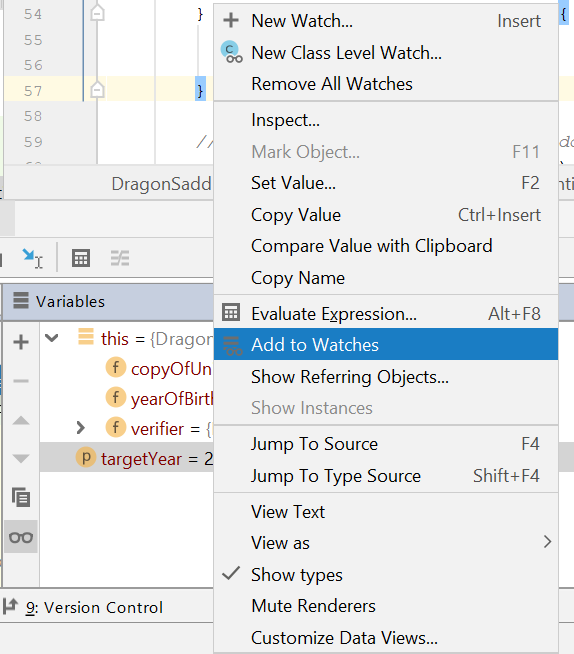
You can also remove all watches using the top item on that menu. After adding a variable to your watches, you'll always see it in your variables pane with a pair of glasses beside it. That way, you can keep an eye on any changes made to it.
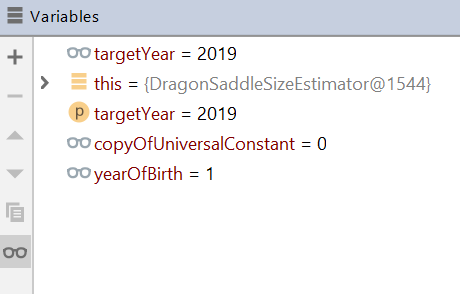
Notice that targetYear, copyOfUniversalConstant, and yearOfBirth all have glasses next to them.
Watchpoints
Can I pause the debugger when a variable changes?
If the variable you are watching is a field in a class, you can add a watchpoint to it, and the debugger will automatically break and suspend on any line that modifies that field. You can also add a watchpoint using your IDE by clicking in the gutter beside a field declaration, as you would to add a breakpoint anywhere else. This will display a red eye, as opposed to the red circle you've seen so far!
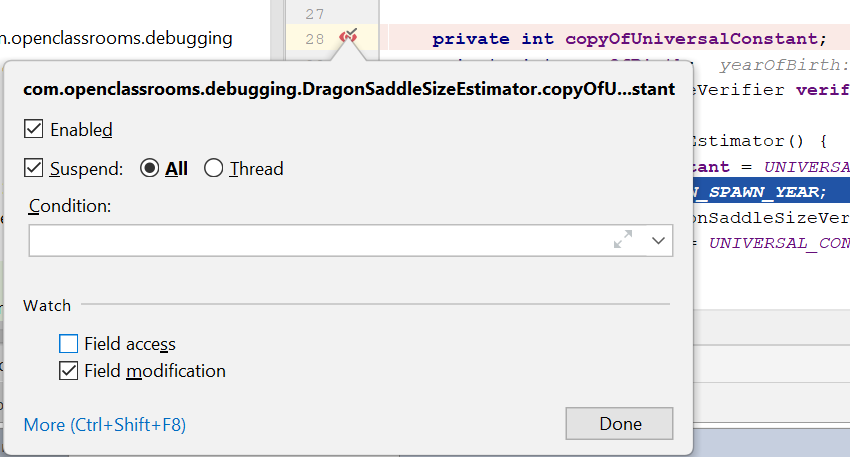
Right-clicking on it opens a similar dialogue to the one used for breakpoints. This allows you to mark checkbox if you want to break on Field access, (reading the field), Field modification (mutating the field), or both.
Let’s test a theory. If we thought that there was an issue with the copyOfUniversalConstant field in the DragonSaddleSizeEstimator class, how could we keep an eye on changes to copyOfUniversalConstant ? We're going to place a watchpoint on it and find out what changes it:
Did you see how we used a watchpoint to break on any Java statement that changed the value of the copyOfUniversalConstant field? Now, let's examine the evidence together.
By setting a watchpoint on copyofUniversalConstant, we learned:
copyOfUniversalConstantis initially set in the constructor ofDragonSaddleSizeEstimator.It is set from a static variable, a constant, named
UNIVERSAL_CONSTANT.At the point of setting
copyOfUniversalConstant,UNIVERSAL_CONSTANThas a value of 0.UNIVERSAL_CONSTANTis the second definition inDragonSaddleSizeEstimatorand hardcoded to 42.The static variable
INSTANCEis set right before definingUNIVERSAL_CONSTANT.UNIVERSAL_CONSTANTwas used in the constructor before it was assigned the value of 42.
Elementary.🕵🏽 It stands to reason that due to an ordering issue, UNIVERSAL_CONSTANT gets used in a constructor invocation before it's set. Together with our other debugging tools, we were able to see that a static variable gets used before it is set.
Now, let's test out our new theory. The top few lines of our DragonSaddleSizeEstimator resemble the following:
public class DragonSaddleSizeEstimator {

    // Singleton instance of the Dragon Size Estimator
    public static final DragonSaddleSizeEstimator INSTANCE = new DragonSaddleSizeEstimator();

    /**
     * The universal constant which is 42.
     */
    public static int UNIVERSAL_CONSTANT = 42;

    // The year when dragons were first spawned on Earth in 1 AD
    public static final int DRAGON_SPAWN_YEAR = 1;

    // Private fields
    private int copyOfUniversalConstant;
    private int yearOfBirth;
    private DragonSaddleSizeVerifier verifier;

    /**
     * Constructor
     **/
    public DragonSaddleSizeEstimator() {
        copyOfUniversalConstant = UNIVERSAL_CONSTANT;
        yearOfBirth = DRAGON_SPAWN_YEAR;
        ...
    }

    ....
}
Line 4: The assignment of instance calls the constructor on Line 22.
Line 9:
UNIVERSAL_CONSTANTgets set to 42 after an instance was created.Line 12:
DRAGON_SPAWN_YEARgets set to 1 after the instance was created.Line 23: The first time the constructor was called from Line 4,
UNIVERSAL_CONSTANThad not even been set. Java defaults such an integer value to 0.Line 24: The first time the constructor was called from Line 4,
DRAGON_SPAWN_YEARhad not yet been set. Again, Java defaulted this to 0. Even though it was a 0!
You're saying that the final variable at Line 12 was used before it was set? Finals can't be changed!
Good spot. You're right. This is mostly the case, but because of Java's control flow for static entities, this isn't the case when it comes to static fields. Java first scans to find all static fields and creates them with default values. In this case, int has defaulted to 0. It then assigns and executes them in the order in which they occur in the code. This means that Line 4 is assigned first.
It does the initial assignment of copyOfUniversalConstant=UNIVERSAL_CONSTANT before we get around to setting UNIVERSAL_CONSTANT from the default of 0 to 42.
Yes, Java would blow up and complain in an ideal world. But it doesn't in this one. It's a quirk of the language which, as you've seen here, can easily come up and surprise you. It doesn't do what you'd expect!
What's the fix?
Simply move Line 4 after Lines 9 and 12. This way, the static variables will have been set before they get used. But how do we prove this theory? Like any other theory; we need to test it out. Let's have another look at the top of the DragonSaddleSizeEstimator class, with the comments tidied a bit:
public class DragonSaddleSizeEstimator {

    /**
     * Singleton instance of the Dragon Size Estimator
     **/
    // Makes use of the next two defined static variables
    public static final DragonSaddleSizeEstimator INSTANCE = new DragonSaddleSizeEstimator();

    /**
     * The universal constant which is 42.
     */
     // FIXME this isn't a constant until you add final
    public static int UNIVERSAL_CONSTANT = 42;

    /**
     * The year when dragons were first spawned on Earth in 1 AD
     **/
    public static final int DRAGON_SPAWN_YEAR = 1;
...
}
Since the top-most static variable is dependent on the two which follow it, the fix will involve a reshuffle, moving this beneath the variable at Line 18. That's because the constructor currently called at Line 7 will call those two values.
If you get the fix right, your integration test should start passing. Let's do it together.
Fixing the Bug
We'll run the integration test first and remind ourselves of the original bug in the program. We also want to find out why there is that weird workaround of passing in a year as an argument to the program. We can then target the underlying cause and fix it. Let's gather all the suspects in the library and suss this bug out!
Did you notice how the main method had been forced to work when an argument was passed to it? It called a setter, which reset copyOfUniversalConstant . Constants aren't supposed to change; that copy might only exist so it can be reset.
Using that kind of fix is like putting duct tape on your code. It's not a long-term solution, particularly as it doesn't fix the DragonSaddleSizeEstimator class. If we wrote another class that needed to use the DragonSaddleSizeEstimator, we'd have to apply the same duct tape everywhere. The underlying issue would still remain in the code. Instead, we fixed the issue by moving the declaration of instance down to where we set the variables it's dependent on.
Our debugger gave us a magnifying glass on steroids, with which we were able to crack this mystery. The code needs to be cleaned up, and fortunately, it's working, with tests. Whoever cleans this up will have confidence that they aren't breaking it further.
Try it Out for Yourself!
The fix is on the branch titled bug-fix-1:
Checkout this branch and run the program for yourself.
Git checkout bug-fix-1 or in IntelliJ VCS -> git -> branches -> origin/bug-fix-1 -> Checkout As
Try setting a watchpoint on
copyOfUniversalConstantand see where it's accessed and modified.
Does it look like we've fixed it?
Let's Recap!
The execution flow controls in your debugger allow you to:
Show Execution Point Refresh the editor to display your current breakpoint.
Step Over Execute the command at the current breakpoint and suspend on the next line.
Step In Enter the method you've got a breakpoint on and break inside it.
Force Step In Step in on a method of the JDK like
new Double()).Step Out Complete the current method and suspend immediately after the caller.
Drop Frame Go back to the caller of this method, as though this method was never called; undoing any changes.
Run to Cursor Resume from this breakpoint and execute all statements, breaking again when you reach the line cursor it is currently on.
Evaluate Expression Execute any Java statement you want. You can view values and test potential code changes without changing the source code!
Watches is a list of variables you want to pin to your Variables Pane. This lets you keep an eye on any changes.
Watchpoints are variables that you not only watch but have also configured to trigger breakpoints on any statements which attempt to access or modify them. You can use this to find the piece of code which is not correctly setting one of them.