Get some practice creating a to-do list application
It's your turn!
Your disorganized friend needs your help! They've asked you to create a to-do list application to help them keep track of what they need to do (including arriving on time to hang out with you). Luckily, you've already got a design ready from the work you've done in this course!
Step 1: implement a UML diagram
This is the same one we designed in the last part of this course:
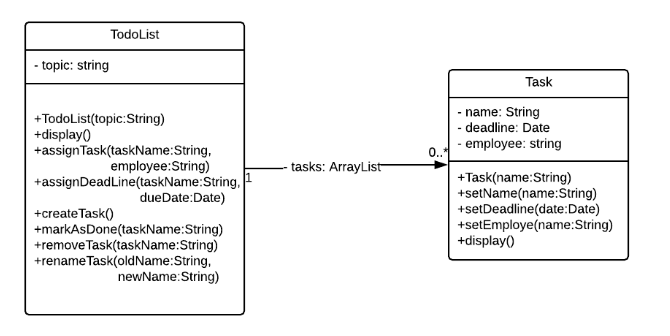
Your code should be as close as possible to the diagram.
In particular, your code should respect names, types, and visibility.
Add utility methods to make your methods as close to the clean code principles as possible.
Only public methods should be documented with Javadoc comments.
Step 2 - test your methods
You will write support methods in a Tests class as part of your application. The test suite will be run before the actual menu when the program is run.
Write a
testAll()method that will run all tests at once and write the results into atestsResults.txtfile.Make sure to have at least one test per public method.
You are not required to test your utility methods. If you do, mark them as
package, instead ofprivateso that the test methods can access them.The output of the tests will be printed to the screen and remain visible until the user hits the return key ⮐.
Step 3 - write a user menu
You will write a menu that lets users:
Create a new to-do list. They will have to provide a topic that will identify the list. If a list with the same topic already exists, the user will be prompted to use another topic.
Add a task to a given to-do list. Two tasks cannot have the same name in the same TodoList. When creating the task, the user is given the choice to add a due date and/or assign an employee to perform the task.
Edit a task. This can mean changing the name, setting a due date, or designating an employee to perform the task.
Mark a task as done.
There are several ways to achieve this. All code must be inside the Menu class .
The main method must be as small as possible. Its job is to run the tests and run the menu when the code is run!
Resources
There's already some boilerplate code (Four predefined classes: TodoList, Task, Menu, and Test) prepared for you. You can choose to do this activity either in the interactive exercise platform below, or you can download the code and work directly on your computer.
Interactive Exercise
To access the exercise, click this link.
Check your work!
Check the content of the classes, and verify that:
The
TodoListclass has the name TodoList and is composed of two fieldsa
topicfield of typeStringa
tasksfield of typeListorArrayList
The
Taskclass has the name Task and is composed of three fields:a name field of type String
a deadline field of type Date
an employee field of type String
Check that both classes have at least the correct methods, with the right names, parameters, and return values
Run the code and verify that:
A list of tests is printed and remains displayed until the user hits the return key⮐
There is at least one test for each public method
All tests pass
The output of the tests is written in a testsResults.txt file
Hit the return key ⮐ and check that:
A menu is displayed with an option for each action and an option to quit the program
You can create a new to-do list and provide a topic to identify it
You can add a task, assign it to someone, and set a deadline
You can display the list of all tasks
The menu is displayed again after an action is completed
The program exits when the associated option is selected
Are you done? Sure? Then take a look at the example below to see how you got on!