Plan the Deployment
The Libra application prototype is now containerized! Liam is thrilled. A strong believer in the “release early, release often” strategy, he urges you to put an online demo instance in place to show investors the project’s progress. It’s time to think about moving to production!
Prepare Your Deployment
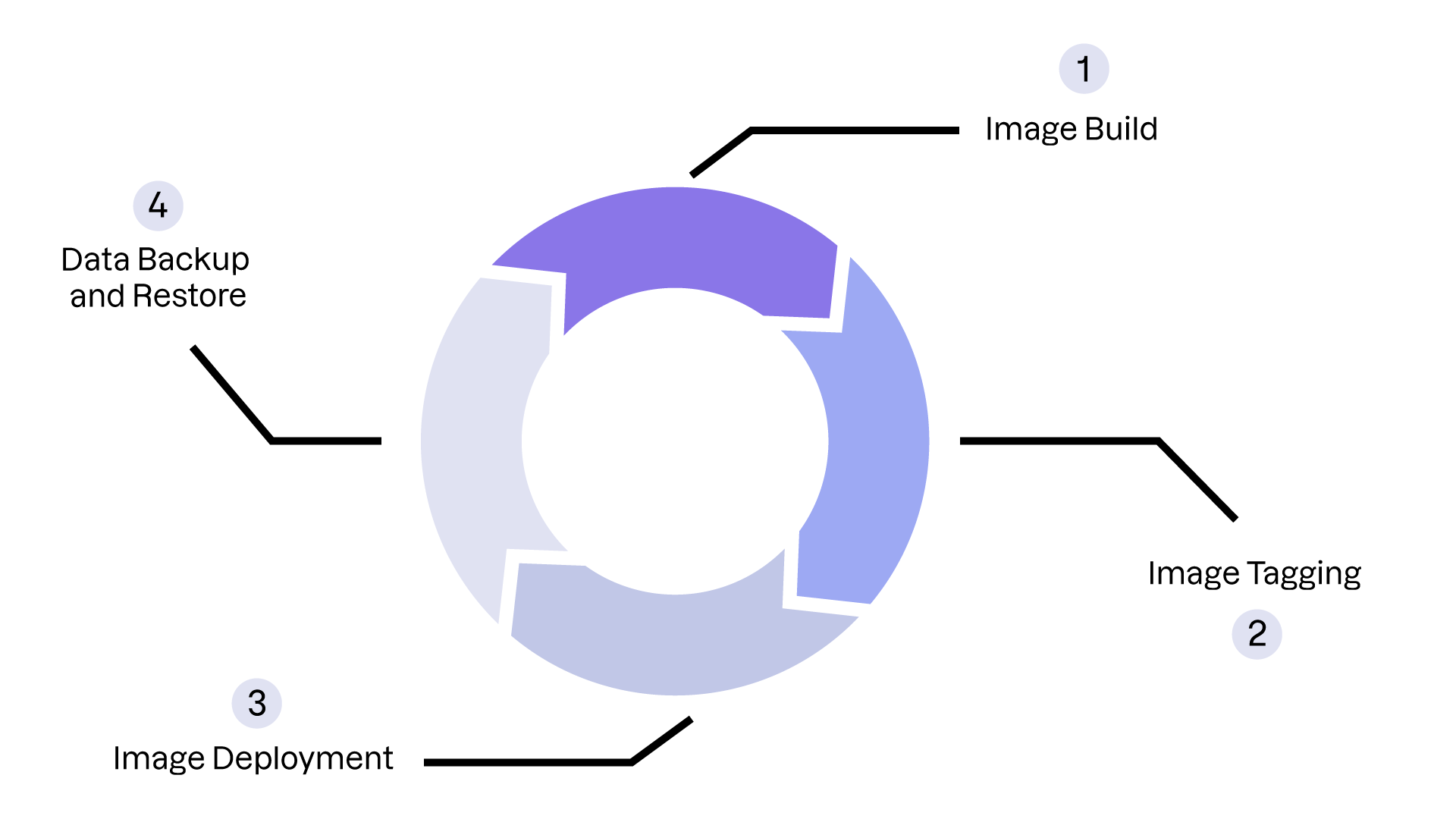
To deploy and maintain a containerized application efficiently, it’s essential to understand the complete deployment and maintenance cycle. Here are some of the key steps to consider:
Image construction: You’ve already mastered this step.
Image tagging: A strong tagging strategy is crucial for version management.
Image deployment: You already know how to start and stop Docker containers. Later in this part, we’ll look at deploying more complex environments with Docker Compose.
Backing up and restoring data: This is critical for the security of any digital infrastructure. Schedule regular backups to avoid data loss!
Define Your Tagging Strategy
When working with images using Docker commands, you may have noticed that image names follow this format:<image_name>:<tag>. A tag is a piece of metadata associated with an image that makes it easier to identify.
But aren’t there other ways to identify images?
Absolutely! Docker’s storage system uses a content-addressable mechanism. Each image is also identified by a SHA256 digest generated from its content and metadata. Any change to the Dockerfile or its metadata produces a new identifier.
If you’ve been paying attention, you’ve also seen thelatesttag appear frequently. It’s the default tag assigned during image creation. However, it is recommended that you use explicit tags to manage your application versions.
Docker tags don’t follow a strict format. You’re free to define your own strategy. The most common approaches include:
Semver (Semantic Versioning): Use tags like
v1.0.0orv1.1.0to track major, minor, and patch versions.Date-based: Use dates like
2024-07-17, useful for daily or weekly deployments.Environment-specific: Use tags such as
dev,staging, orprodto differentiate environments.
These strategies can be combined and adapted to your needs. Just remember to maintain consistency so you can clearly understand the progression between versions.
Apply and Remove Tags With Docker Commands
To apply a tag to a Docker image, usedocker tag:
docker tag <tag> <image_name:current_tag>
Example:
docker tag v0.0.1 libra:latest
To remove a tag, usedocker rmi:
docker rmi <image_name:tag>
Example:
docker rmi libra:v0.0.1
You can now identify and organize your image versions effectively, which will make it easier to deliver updates across your environments.
Next, let’s explore how to back up and restore your application—a mandatory step in establishing a reliable delivery cycle.
Back Up and Restore Your Application
It’s essential to perform regular backups of your containerized applications to avoid data loss. Docker natively offers two strategies:
Strategy | Advantages | Disadvantages |
Snapshots using |
|
|
Sidecar container with shared volumes |
|
|
In the following videos, we’ll examine how to apply both strategies. Let’s begin with the easiest: the snapshot technique.
This video explains how to perform a full backup and restore using the snapshot method:
While simple, this technique is limited—especially when your application stores live data in volumes. In that case, you should use the second technique: the sidecar container.
This video shows how to perform a hot backup of a container and its volumes using the sidecar strategy, and how to restore the backed-up data afterward.
With this knowledge, you're now ready to deploy and maintain a containerized application in production. Time to practice!
Over to You!

Context
In a hallway, Sarah, the CTO, calls out to you:
I’ve heard Liam wants you to deploy the Libra PoC. I know he wants to move fast, but before we hand anything to the test panel, I want to be sure we know how to back up and restore the application…
Like most applications, Libra stores persistent data—specifically encrypted files exchanged between lawyers and their clients. You need to show Sarah that you can apply what you’ve learned about backup and restore so the service can be deployed confidently.
In its container-based integration, Libra stores persistent data only in the/uploadsdirectory.
Instructions
Use the sidecar container strategy to back up Libra’s persistent data.
Use the backed-up data to restore Libra’s application data.
Check Your Work With This Example
Start your container
docker run -it --rm -p 8080:8080 --name libra libra:latest
Perform the backup
docker run --rm --volumes-from libra -v $(pwd):/backup ubuntu tar cvf /backup/backup.tar /uploads
Restore a backup
docker run -it --rm --volumes-from libra -v $(pwd):/backup ubuntu /bin/bash -c "cd /uploads && rm -rf /uploads/* && tar -xzf /backup/backup_.tar.gz --strip 1"
Summary
It’s essential to plan the entire deployment cycle to ensure everything runs smoothly.
Use tagging conventions such as Semver, date-based, or environment-specific to manage application versions and streamline deployments.
Choose the right backup and restore strategy for your containerized applications. If your application stores persistent data, the sidecar strategy is generally the best option.
Now that our deployment is prepared, it’s time to publish our images!