Secure Your Deployment
The Libra demo instance has been up and running for a few weeks now. All indicators look good, and Liam is thrilled. However, one evening, Sarah sends you an alarming message:
We ran a security scan on the infrastructure and just detected that the Libra container image is full of vulnerabilities… We need to fix this quickly before Liam asks us to move the application to production!
What security questions should you be asking when maintaining containerized infrastructures?
Security is a cross-cutting concern, and Docker is no exception. Securing an application isn't just about protecting containers or the application code itself — it now requires a holistic approach aligned with DevOps and DevSecOps practices.
Make Safety Part of Your Integration Process
Containerization has profoundly transformed the design and implementation of the software development cycle. This transformation has affected many aspects, but the most striking effect is undoubtedly the integration of security into the production process.
Let's take a look at how the application design and deployment lifecycle has changed, and why security has naturally become its central theme.
Traditional Application Deployment Lifecycle
In a traditional application deployment model, development and operational (Ops) teams had separate responsibilities. Here's an overview of typical steps:
1. Development:
The developers write the application code.
The code is tested in a development and testing environment.
Once the code is deemed stable, it is prepared for deployment.
2. Delivery:
The development teams hand over the code to the operational teams.
Ops teams take charge of the code and validate the installation procedure in a testing environment.
3. Deployment:
Ops teams deploy the code on physical or virtual servers.
They configure the servers, install the necessary dependencies, and make sure the application works properly.
4. Maintenance:
Ops teams monitor servers and the application for any problems.
They manage security updates for servers and application dependencies.
Security patches and updates are applied regularly.
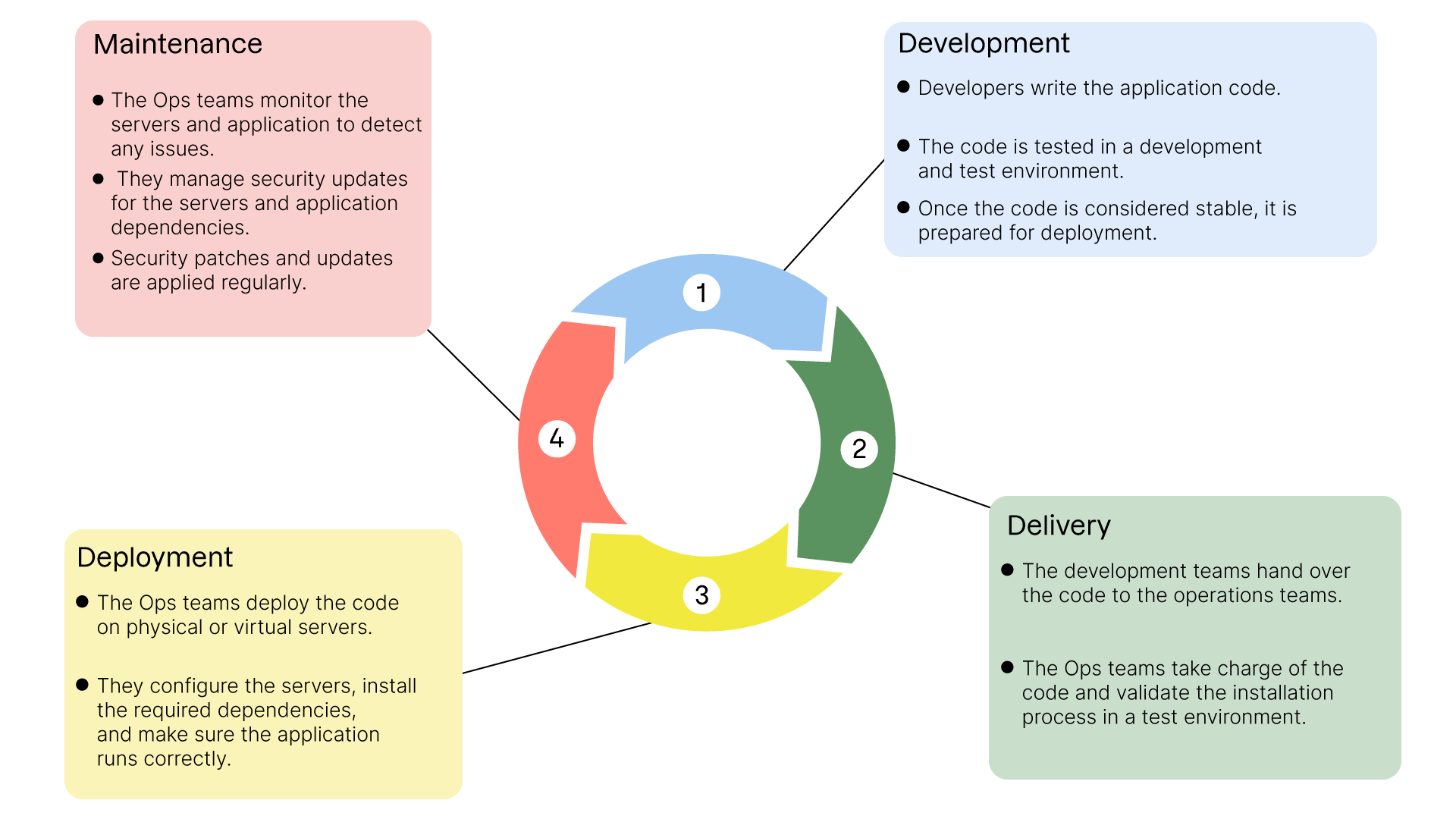
In this model, server security and system dependencies are primarily the responsibility of the Ops teams. The developers concentrate primarily on the application code.
If the Libra application were developed according to this model, its execution environment would only be addressed at the very end of the production chain! For an application whose purpose is the transfer of confidential documents, it might seem particularly dangerous to leave such uncertainty until the doorstep of deployment...
Current Working Methods with Containerization
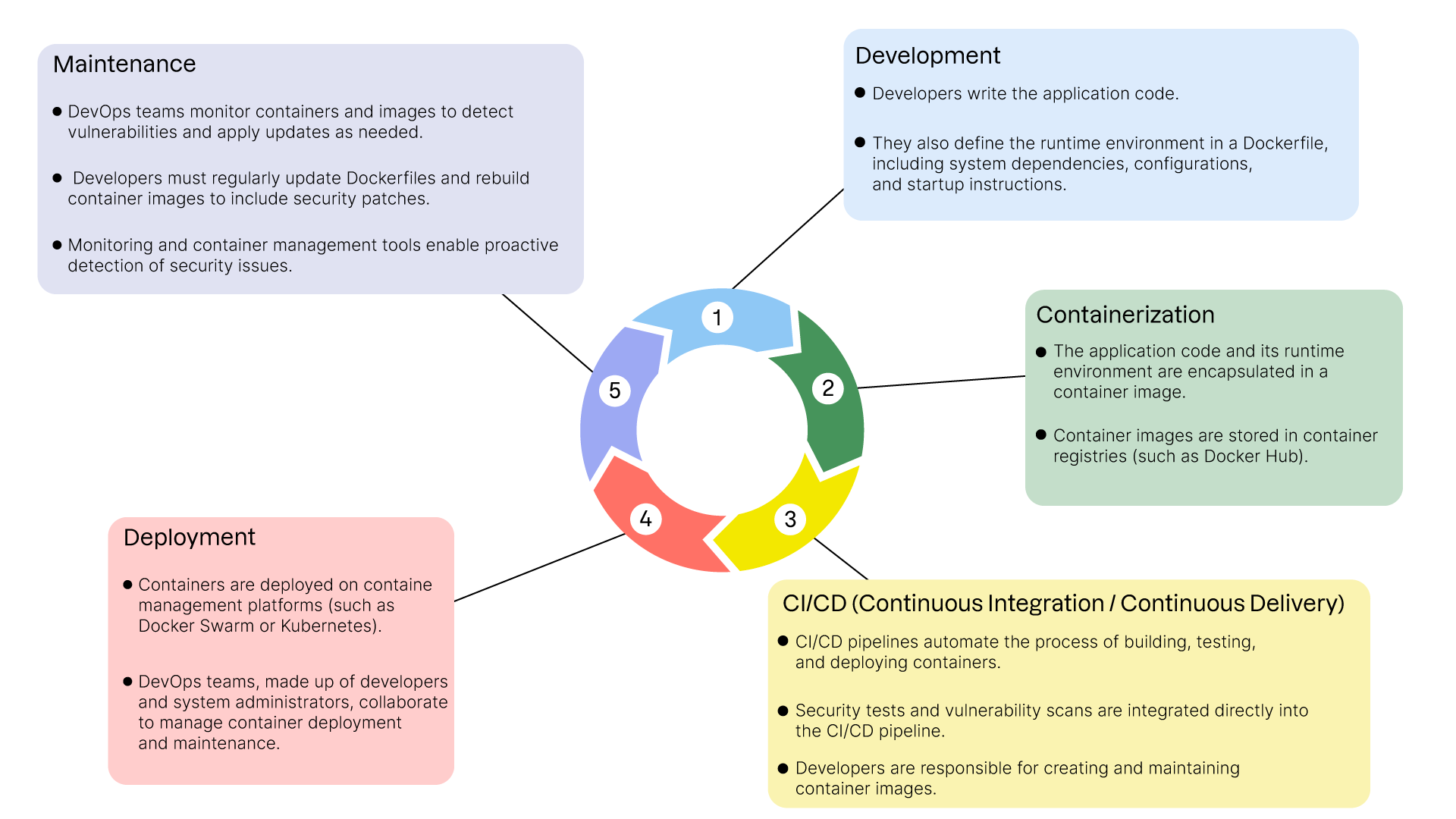
With the emergence of containers and DevOps (Development and Operations) practices, the application deployment lifecycle has changed significantly:
1. Development:
The developers write the application code.
They also define the runtime environment in a Dockerfile. This includes system dependencies, configurations, and startup instructions.
2. Containerization:
The application code and its execution environment are encapsulated in a container image.
Container images are stored in container registries (such as Docker Hub).
3. CI/CD (Continuous Integration/Continuous Delivery):
CI/CD pipelines automate the process of building, testing, and deploying containers.
Security tests and vulnerability scans are integrated directly into the CI/CD pipeline.
Developers are responsible for creating and updating container images.
4. Deployment:
Containers are deployed on container management platforms (such as Docker Swarm or Kubernetes).
DevOps teams, often made up of developers and system administrators, work together to manage container deployment and maintenance.
5. Maintenance:
DevOps teams monitor containers and images for vulnerabilities and necessary updates.
Developers must regularly update Dockerfiles and rebuild container images to include security patches.
Container monitoring and management tools enable proactive detection of security issues.
Shift Responsibility for Updates.
With these new methods, responsibility for security and updates to runtime environments shifts to developers and DevOps teams. This shift can take several forms:
Entirely Managed by Developers:
Developers manage everything from creating Dockerfiles to updating dependencies and container images.
Ops teams can provide tips and tools, but developers have total control over the runtime environment.
Responsibility Shared Between Developers and Administrators:
Developers create the Dockerfiles and manage the application's dependencies.
System administrators manage deployment infrastructures and provide security guidelines.
Close collaboration to ensure security best practices are followed.
Responsibility in the Hands of Administrators:
System administrators remain responsible for the security and maintenance of base images used by developers.
Developers follow the guidelines and images provided by administrators, focusing on the application code.
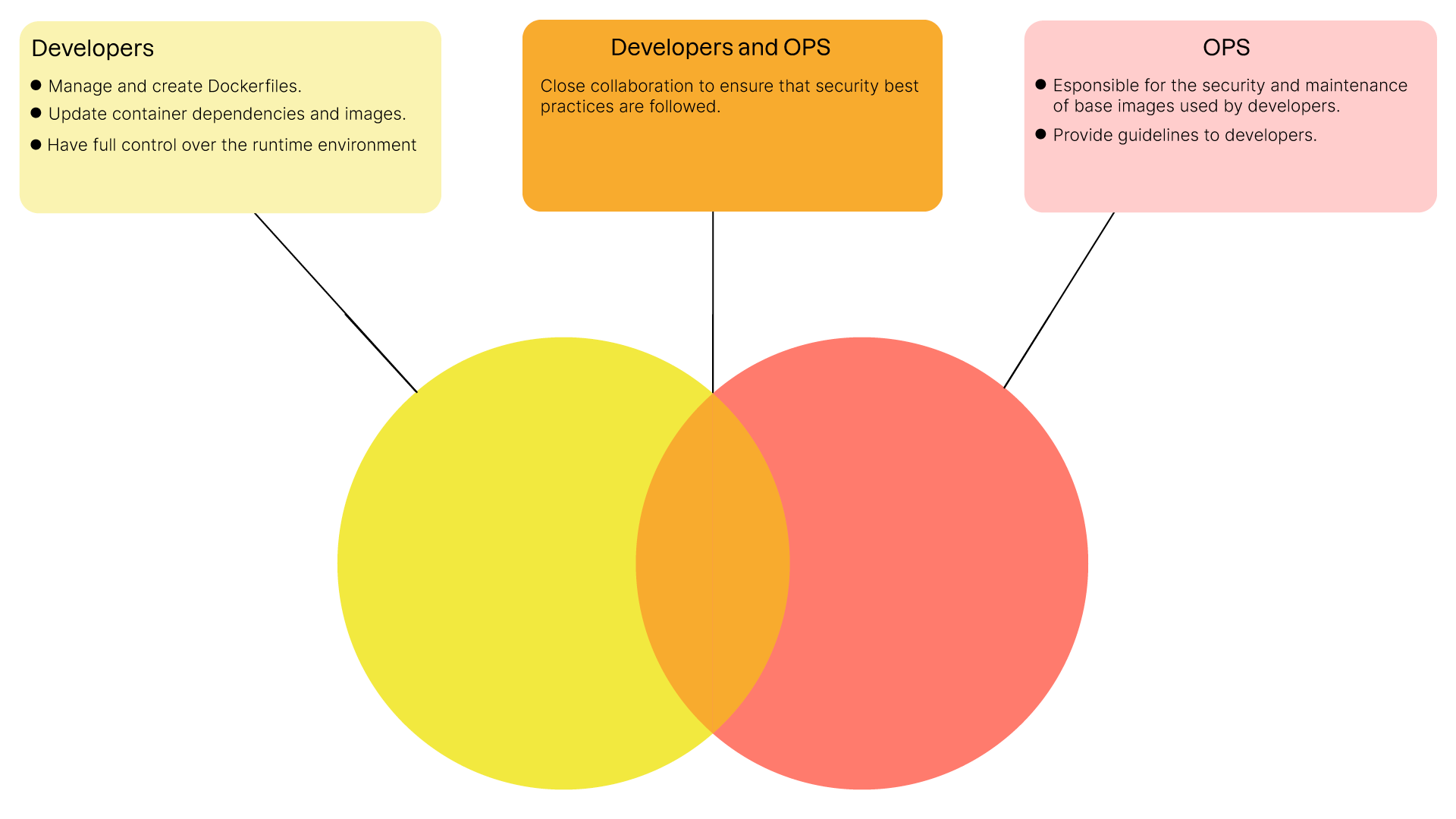
Each of these distributions has its own advantages and disadvantages, and it's up to each team to choose the one that suits them best.
It is important to remember, however, that the advent of containerization has shifted the management of security issues further upstream in the development process, rather than further downstream, as was (often) the case historically.
Protect Yourself from "System" Vulnerabilities.
Security is a major concern in the development and deployment of modern applications. Detecting and mitigating system vulnerabilities is crucial to maintaining a secure environment.
An application such as Libra, for which security is the main selling point, couldn't be considered secure if particular attention wasn't paid to the operating system on which it runs. As the well-known saying goes, "What's the point of closing your windows if the door remains wide open?"
Let's take a look at some strategies and tools for protecting your containers from system vulnerabilities.
Define a DevOps Strategy for Early Vulnerability Detection
An effective DevOps strategy for security involves integrating security practices throughout the development and deployment cycle. Here are some key elements:
Continuously Parse Container Images:
Scanning Tools: Use tools like Trivy or Clair to scan your container images regularly. These tools can identify known vulnerabilities (Common Vulnerabilities and Exposures, CVEs) in your images.
Automation: Integrate these tools into your continuous integration/continuous delivery (CI/CD) pipeline to automate scans with each new build. This ensures that vulnerabilities are detected as soon as possible.
Integrated Security Pipeline:
Security Steps: Add specific steps to your CI/CD (Continuous Integration/Continuous Delivery) pipeline to perform security tests. For example, a step to scan container images after build and before deployment.
Code Review: Integrate security-focused code reviews and regular security audits into your development processes. Static code analysis tools like SonarQube can also be integrated directly into your CI/CD pipelines to detect some of the bad practices or even proven flaws in the application's source code.
Let's look at an example of using a scan tool, Trivy, to detect the presence of vulnerabilities in a container image.
In this video, we've seen that:
How to install Trivy on your device.
How to use the Trivy
image <image_name>commandtoperform a security scan of a given image.How to read the Trivy scan report and view the vulnerabilities identified.
How to correct a flaw and validate the patch by running the Trivy command on the updated image.
Fix System Dependency Versions
Although it can be counterintuitive, fixing the versions of system dependencies is an essential practice for maintaining the security of your containers. Here's why:
Predictability and Stability:
Version Control: By fixing versions, you ensure that your development, test, and production environments use the same versions of dependencies, reducing the risk of unexpected behavior.
Risk Reduction: Unexpected updates can introduce new vulnerabilities or incompatibilities. By fixing versions, you control changes and can test them upstream.
Update Management:
Update Planning: Fixing versions lets you plan and test updates in a controlled way. You can assess the impact of new versions before deploying them in production.
Documentation and Compliance: Fixing versions allows you to better document dependencies and comply with security and compliance requirements.
By implementing these best practices, you'll improve the security of your deployments. But there's another, particularly effective way to improve the security of a system: reduce its attack surface.
Reduce the Attack Surface of Your Containers
Reducing the attack surface of your containers is essential to minimize security risks. By adopting specific practices, you can limit potential vulnerabilities and enhance the security of your containerized environments.
Use Reduced System Images
Reduced system images are designed to be as minimalist as possible, containing only the essential components needed to run your application.
Why Use Reduced Images?
Using a reduced image brings a number of advantages, the main ones being:
Fewer Potential Vulnerabilities: Reduced images contain fewer packages and libraries, reducing the number of entry points for attacks.
Improved Performance: Reduced images are often lighter, which can improve start-up times and overall container performance.
Simplified Maintenance: Fewer components mean fewer updates and patches to manage, simplifying maintenance.
Use an Unprivileged User Account
Running processes in your containers with unprivileged user accounts is a good practice to limit the risk of privilege escalation in the event of compromise. Here's how and why to implement this practice.
Why Use an Unprivileged User Account?
Limiting the Impact of a Compromise: If an attacker gains access to a container, capacity for action will be limited if the container is not running processes as root.
Security Best Practices: Running processes as an unprivileged user is a standard recommendation for secure environments.
Here's a basic example of a Dockerfile creating and using a standard user:
# We use a reduced-size image here # Alpine Linux version 3.20 FROM alpine:3.20 # We install our application's dependencies RUN apk add python3 # We create the user "myuser" with standard rights RUN adduser -D -s /bin/sh myuser # We switch to the user "myuser" USER myuser # We copy our application's sources into the "app" directory # of our new user's $HOME COPY . /app /home/myuser/app # Define /home/myuser/app as the WORKDIR directory # /home/myuser/app # Define the command to be executed when launching # the container, in this case a Python application. CMD ["python3", "app.py"]
Reduce Administrator Account Capacity
Sometimes, administrative privileges are required, but it is possible to reduce the administrator account's capacity to improve security.
In a GNU/Linux system, capabilities are security attributes that allow you to restrict or segment the privileges usually associated with the root account. Instead of giving a process full root privileges, capabilities enable specific, limited privileges to be given to a process, thus reducing the attack surface. Here are some examples of capabilities:
CAP_NET_BIND_SERVICE: Allows sockets to be bound to port numbers below 1,024.
CAP_SYS_ADMIN: Allows various administrative operations, such as mounting file systems or modifying certain kernel parameters.
CAP_DAC_OVERRIDE: Allows you to bypass DAC (Discretionary Access Control) access controls, authorizing access to normally protected files.
CAP_SYS_TIME: Allows you to modify the system clock.
CAP_CHOWN: Allows you to change the owner of a file.
With Docker, for example, you can define capabilities at container startup in the following way:
docker run --cap-drop=ALL --cap-add=NET_BIND_SERVICE my-image
In this case, this means deleting all capabilities associated with the administrator account and then restoring its ability to listen on a privileged port (port < 1,024).
Armed with these new skills, you can now improve the security of your containerized infrastructure. Let's get started!
Over to You!

Context
To address Sarah's concerns and demonstrate that it's entirely possible to secure the Libra application before it goes into production, you need to apply the best practices you've learned in this chapter to the application's Dockerfile.
Edit the Dockerfile you wrote earlier and improve it by:
using a basic image with reduced surface area;
setting system dependency versions.
creating and using a standard user to run the Libra application.
Instructions
Use Trivy to scan the Libra image and identify vulnerabilities.
Minimize the image’s attack surface by reducing unnecessary components.
Use a multi-stage Dockerfile and a lightweight base image.
Run the application using a non-root user.
Remove unnecessary Linux capabilities.
Summary
Security must be integrated at every stage of your application's lifecycle.
Tools like Trivy help you detect vulnerabilities in your images and dependencies.
Reducing the attack surface and hardening your runtime environment improves long-term resilience.
Follow best practices: minimal base images, non-root execution, restricted capabilities, and continuous scanning.
Now that your application is secure and optimized, let’s explore how to improve its execution across different environments!