Discover the Different Types of Containers
Lay out Information
The different types defined and used in a program are known as data structures. They’re a bit like LEGO structures with a specific purpose, such as wheels, windows, carts, or lakes, etc.
If we try to enter data manually into an algorithm, we’ll quickly reach the limits of our patience! Sometimes we want to be able to enter a whole set of data organized in a certain way, to improve a program's efficiency. Or, sometimes we want to generate a certain structure to use it elsewhere later.
There are many different data structures, but we’re going to focus on the best-known:
Arrays, linked lists, and hash tables
Stacks and queues
Binary trees and graphs
In these data structures, you can create, read, modify, and delete elements. These actions are known as operations, and there are many different types.
The type of operation we want to perform determines the choice of structure—some are more suitable for carrying out searches, and others for creating or deleting elements, etc.
Let’s get started right away with a look at arrays!
Discover Arrays
An array is a structure which stores sets of data of the same or different types.
For example, here’s an array for the objects hidden in the maze:
Index | Value |
0 | Key |
1 | Crowbar |
2 | Sword |
In an array, each element is linked to a number which assigns it its position, starting from zero. It’s just like a numbered list!
This position is called an index. It’s important to remember that the first element in the list takes index number 0, not 1! ;-)
Here are some important points about the array above:
The index starts at zero.
The size of the array is three, which means it can store three elements.
Each element can be accessed via its index. For example, we can access the
crowbarusing index 1.
In the pseudocode, we can declare the array objects with five elements, for example, like this:
Array algorithm
Variable
   objects[5] : ARRAY STRING
Start
End
Here’s an explanation:
First, we need to provide the name of the array and declare its size in square brackets.
Then, type a colon and specify the type of the array.
It’s also a good idea to state the type of value contained in each box. Here, I’ve stated that it’s an array of strings.
Pros and Cons
On the plus side, the index makes it very easy to read and modify data in an array. Each data entry has a number, so as long as you know the number, you have all the data at your fingertips!
On the downside, in many programming languages, the size of an array is fixed. This means that you can’t add or delete data from an array—instead, you have to make a copy to account for your additions or deletions. This can make life a bit difficult if you often need to change the size of an array.
In this case, it’s better to use other data structures, such as linked lists.
Discover Linked Lists
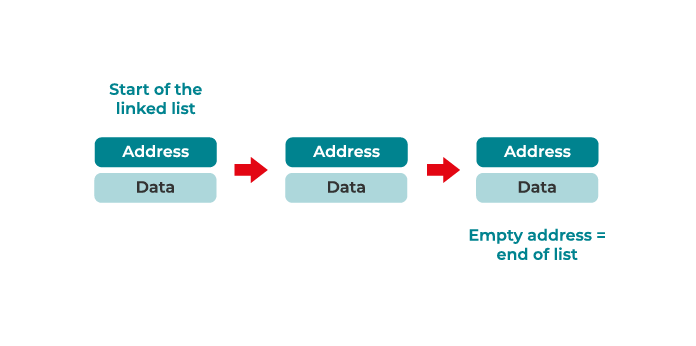
Linked lists are a set of values saved in different places in the memory. Unlike arrays, which contain a fixed number of elements, linked lists are very flexible, and you can add or delete elements as you wish.
A linked list is a linear data structure made up of a series of connected nodes. Here, each node stores the data and address of the following node. The last element in the list will have an empty address.
What exactly are these used for?
In an array, each piece of information is stored next to the other in your computer’s memory. This allows you to access the data easily, but makes it less flexible. A linked list makes it easier to add and delete values, but it takes a bit longer to access the elements.
Pros and Cons
In a linked list, you can add an element at the start or end of the list. However, it’s a bit more complicated, as you need to go through the whole list to find a node with an empty address. Also, when you want to search for an element, you have to go through the list from start to end to find it.
Sometimes, you might need to link two elements to each other, but linked lists don’t allow you to link an index to an element, like arrays do. However, you can use hash tables to link two elements of any type. This is known as a key-value pair.
Discover Hash Tables
A hash table is a data structure which you can use to link a value to a key, rather than an index. The key can be a word or a number. For example, this hash table stores the association between the type of vehicle and its number of wheels:
Type of vehicle (key) | Number of wheels (value) |
car | 4 |
motorbike | 2 |
Hash tables don’t follow a set order. Unlike arrays, you can’t use the position of an element to locate it—only its key. It’s a very common and very useful structure!
Common Operations
To find a value, we need to use its key, rather than an index like with an array.
If the hash table above is called wheels , then to find the number of wheels corresponding to a car, we’d write wheels[“car”] .
Hash tables are very flexible, and allow you to quickly add or delete data.
Understand More Complex Data Structures
But what happens if you want to access your data in order of entry? For example, if you want to find the first data entered first?
Well, allow me to introduce you to stacks and queues!
Learn About Stacks
Stacks are a type of data structure which provide access to the last data entered. They’re based on the concept of LIFO (last in, first out), which comes in very useful when we want to be able to use the most recent data entered first.
Stacks are very useful for music streaming platforms such as Spotify and Apple Music. When you ask these platforms to play a certain song next, they add it to the top of the playlist.
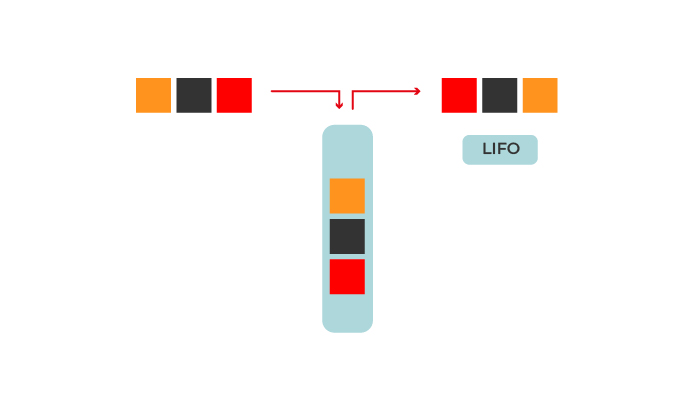
Stacks are used when you need to access the most recent data entered first. It’s a bit like what happens when you stock up your fridge—whatever’s easiest to access normally gets eaten first! This also applies to your Facebook or Instagram feed—the most recent posts appear first, although these platforms also use curation algorithms to display the content which best suits the user’s needs.
But what if we need to access the first information entered, not the most recent? For example, when you create a playlist, you add the songs in the order you want them to be played—the first songs added will be the first to be played. You can’t do that with a stack… which is why queues exist!
Learn About Queues
A queue is a data structure which allows us to access the elements following the FIFO (first in, first out) rule.
It follows the same logic as queues (aka lines) in real life—the earlier you arrive, the earlier you can leave! ;-)
Let’s take an example from daily life. You’ve received a package, so you go to the post office to pick it up. You take a ticket which tells you your place in line, and you can then look at the number displayed on the screen and get an idea of how many people are in front of you. You then probably wish you’d arrived earlier, so you would have had less time to wait! First come, first served!
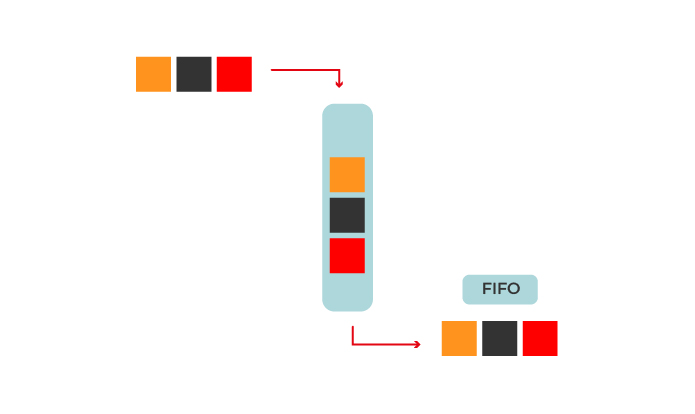
Queues are used when you want to process data in order of arrival. It’s like when you make a to-do list with the most urgent task at the top, or when you make a list of bugs waiting to be resolved.
Over to You!
Context
Here’s our new and improved maze:
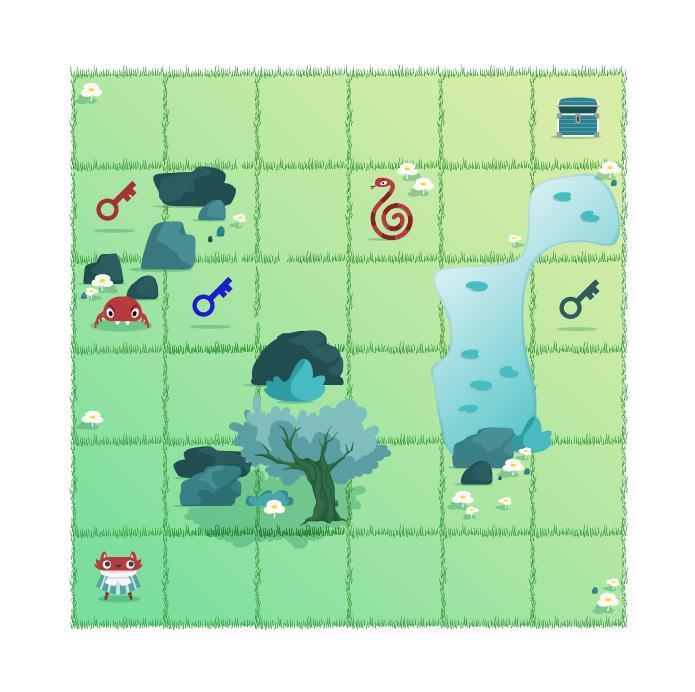
You might have noticed that there are keys in some squares.
Each key has its own name, and there are three different ones in this maze.
The player has a bag to put the keys in.
The player must collect all the keys before reaching the End square.
If they don’t have all the keys, they won’t be able to open the door to leave.
The bag will take the form of an array in our algorithm.
You’ll need to use the two following functions to insert data and return the size of the array:
insert(): This function allows you to insert data in the array, like this:name_of_array.insert(“Your data”)size(): This function returns the number of values in the array, like this:name_of_array.size()
You can also call the moves function to manage the player’s moves.
Instructions
First, you’ll need to create a function to insert the name of the keys in the array when the player lands on the square they’re in.
You can then create a program to manage the player’s moves and to check if they’ve landed on a square containing an object, all within a while loop. The loop stops once the player has picked up all the objects and reaches the End square.
Your Mission
Create the function
pick up, which takes the array and the player coordinates as parameters. This function will insert the names of the keys into the array once the player lands on the square containing them.First, create six variables to assign the
xandycoordinates for each key.Then, create conditional structures to insert the names of the keys into the array, based on the player coordinates and the object coordinates.
Build the algorithm which will call the
movesandpick upfunctions in awhileloop. Don’t forget to add the loop condition and create all the necessary variables.
Check Your Work
Here are the two steps to follow to achieve the intended result of the exercise:
First Step: Create the pick up Function
Pick_up algorithm  (keys, player_position_x, player_position_y)
Variable
   key1_position_x ← 1 : INTEGER
   key1_position_y ← 3 : INTEGER
   key2_position_x ← 5 : INTEGER
   key2_position_y ← 3 : INTEGER
   key3_position_x ← 0 : INTEGER
   key3_position_y ← 4 : INTEGER
Start
   If key1_position_x == player_position_x AND key1_position_y == player_position_y :
      keys.insert(“key 1”)
   End If

   If key2_position_x == player_position_x AND key2_position_y == player_position_y :
      keys.insert(“key 2”)
   End If

   If key3_position_x == player_position_x AND key3_position_y == player_position_y :
      keys.insert(“key 3”)
   End If
End
Second Step: Create the Algorithm to Call the pick up and moves Functions
Maze algorithm
Variable
   player_position_x ← 0 : INTEGER
   player_position_y ← 0 : INTEGER
   end_position_x ← 5 : INTEGER
   end_position_y ← 5 : INTEGER
   keys[3] : ARRAY STRING
Start
   While player_position_x != end_position_x AND player_position_y != end_position_y AND keys.size() != 3:
      moves(player_position_x, player_position_y)
      pick_up(keys, player_position_x, player_position_y)
   End While
End
Let’s Recap!
Data structures are used to store and organize data on your computer, to make it easier to consult and update.
There are three types of basic data structures:
In an array, the elements are stored next to each other. Each value in an array is identified by its index.
A linked list is a sequence of data structures, each one linked to the next.
A hash table is a data structure which stores data in an associative manner. Each value in a hash table has its own unique key which identifies it.
We also have two other, more complex, types of data structure:
In stacks, the elements are stored according to the LIFO principle (last in, first out).
In queues, the elements are stored according to the FIFO principle (first in, first out).
Next, we’re going to look at two data structures which are very useful for finding data using the links between the different data entries. See you in the next chapter!