Understand the Different Storage Media

Discover the 3-2-1 Strategy
With all his files successfully restored, you have really taken a huge weight offMickael’s shoulders.
And just as you showed curiosity about Mickael’s role and how he works, he’s now curious about yours. One morning, you receive a message on the company’s internal messaging system:
Hi, how are you? Thanks again for restoring the files. I hope you like chocolate! I have a quick question: I was telling a friend about what you managed to do, and in her company they’re struggling with unreliable backups. Do you have any advice or pointers I could share with her?
Is this what you’d call a project opportunity?
In a situation like this, there’s no need to bring in a business manager to try to close a deal.
Sometimes, a quick tip costs nothing but goes a long way toward building solid professional relationships.
And this is the perfect opportunity to explain the 3-2-1 backup strategy.
The ‘3‑2‑1 strategy’ is an easy‑to‑remember rule summarizing backup best practices
Why that name? It’s simple:
“3” for at least 3 copies of the data:
The original data
The first backup
The backup of the backup, also known as replication
“2” for at least 2 different types of storage media:
Hard drives or SSDs
Magnetic tapes
Cloud storage
“1” for 1 off-site copy:
Ideally, one backup should be stored at a geographically separate location to protect against disasters.
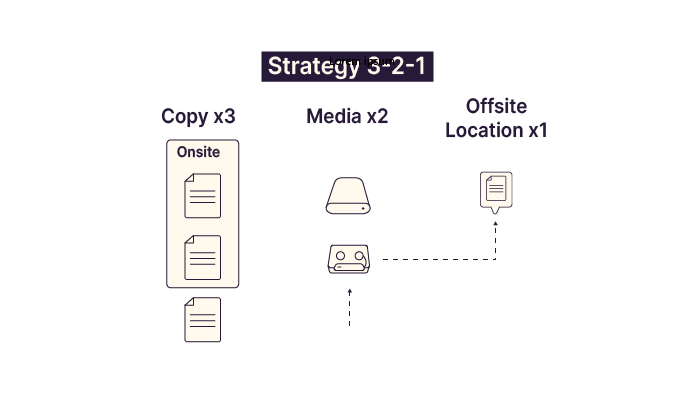
Great—that’s easy to remember. Three copies, on two different media, with one off-site. Simple and effective!
Yes—simple and effective, but no longer fully sufficient. An updated and more robust version is now recommended: the 3-2-1-1-0 strategy.
This evolution adds two additional principles:
“1” for at least 1 offline copy:
Archiving backups on magnetic tape and storing them in a secure safe or via a specialized service provider
Copying backups to external drives that are disconnected after use
If the storage medium is offline or not connected to the network, it cannot be attacked by malware or accidentally deleted.
“0” for zero restore errors:
This highlights the critical importance of regularly testing your backups.
By adding these last two principles, backups become much more resilient and capable of handling the vast majority of restoration scenarios.
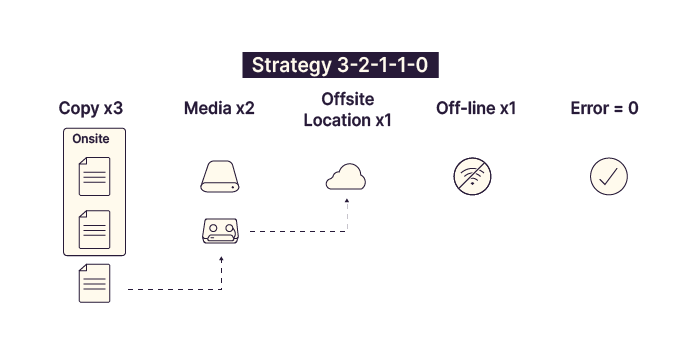
The 3-2-1-1-0 rule helps address virtually every major incident that can occur in a company:
Paul’s files have disappeared!
No problem—I have backups.
The backups of Paul’s files were deleted!
No problem—I have copies of the backups.
A server room caught fire!
No problem—my copy is stored elsewhere.
The Paris site is unavailable due to a power outage!
No problem—I have a copy at the Marseille site.
A hacker deleted all backups!
No problem—I archived backups on magnetic tapes stored securely.
Every scenario has a solution.
Identify the Different Storage Media
Another key consideration when designing a backup strategy is the choice of long-term storage media.
Do you know the difference between backing up data to an external hard drive and using a Cloud storage service, such as those offered by banks?
An external hard drive is a physical medium located within your infrastructure, whereas a digital safe is an online storage service.
Let’s take a quick look at the main types of storage media and their advantages and disadvantages.
Mechanical Hard Drives or Hard Disk Drives (HDDs)
HDDs have been the standard storage medium since the early days of modern computing.
They’re affordable, offer plenty of storage, and are generally reliable—though they do wear out mechanically over time.
However, read/write performance and access speed are average.
While SSDs are increasingly replacing HDDs in storage servers, HDDs are far from obsolete,
and they keep on bringing out new high-capacity models
SSD (Solid-State Drive)
SSDs use flash memory technology and deliver much higher performance in terms of read, write, and access speeds.
Unlike HDDs, SSDs have no moving parts, which makes them more resistant to failure and mechanical wear.
Although still more expensive than HDDs, prices continue to fall, and SSDs offer superior reliability and performance.
Magnetic Tapes
Magnetic tapes, often referred to as LTO (Linear Tape-Open) cartridges, are large cassettes capable of storing tens of terabytes of data.
Read and write speeds are slower than disk-based storage. If a file is located at the end of a tape, the entire tape must be scanned to reach it.
Because they are removable, tapes are ideal for off-site and offline backups.
They can be stored in secure bank vaults or managed by specialized archival service providers.
Cloud Storage
Cloud storage refers to infrastructure hosted and managed by third-party providers. This removes the need to manage hardware, maintenance, security, and scalability.
Major providers offer backup and archival storage with pricing models typically based on:
Access
Storage volume
Performance level
Summary
Storage Type | Advantages | Drawbacks | Typical Use |
HDD | Low cost | Lower performance | Backups and replications |
SSD | High performance | Higher cost | Primary data, backups, replications |
Magnetic tapes | Low cost Offline and removable | Slower access Retrieval delays | Offline and off-site storage |
Cloud | Scalable storage No hardware management | Vendor dependency Higher long-term cost | Primary data, backups, replications |
Each storage medium serves specific use cases. Choosing the right combination involves both technical and financial considerations.
Over to You!

Context
Before opening the Delhi office, EthicalIT had no formal backup strategy. Backups were performed directly to a NAS using scripts triggered automatically during the backup window.
You are now responsible for proposing improvements to implement the 3-2-1 strategy.
Instructions
Create a table highlighting the differences between the current backup approach and your proposed improvements:
Implement data duplication
Define an additional storage medium
Propose an off-site location
Summary
The 3-2-1-1-0 rule helps anticipate all major incidents:
3 copies
On 2 storage media
1 off-site copy
1 offline copy
0 restore errors
Several storage options are available: HDDs, SSDs, magnetic tapes, and cloud storage.
The choice of storage media depends on performance, cost, and intended usage.
You’ve reached the end of Part 1 of this course. Before moving on, take the quiz to assess your knowledge and skills.