Assemble Your Test Cases Into Scenarios

In a film, a script is a sequence of scenes arranged in chronological order.
In software testing, those “scenes” are your test cases, which together form the scenario.
As with requirements, your scenarios may be functional or non-functional:
Functional scenarios describe the behavior of a real user—something an end customer could actually do.
Non-functional scenarios exist to test more technical, performance-related, or security-focused aspects.
Go back to your Test Strategy, where you defined your scenarios at a high level.
Up to now, you have a list that can be expanded.
Here are two techniques—among many others—you can use in a wide variety of situations:
Boundary testing: The Goal is to test the limits and extreme values the feature can handle.
If the shopping cart can hold a maximum of 99 products, what happens if you add 100?
Combination testing: This technique involves testing all possible combinations of variables.
If you can add a product, delete one, change a quantity, and check a total, what happens when you mix these actions?
Add a product, then check the total?
Add several products, add another one, modify the quantity, then check the total?
To help identify the test cases you need, follow these steps:
Parse the scenario: Understand what the scenario aims to verify. Which elements, features, or requirements are involved?
Identify the steps: Break the scenario into logical actions with expected results.
Identify prerequisites: Determine what the system needs before the scenario can run
Let’s use a concrete example with our online store, testing the addition of products to the cart.
⇒ Parse the scenario
The Goal may be to test that:
The site is accessible.
You can view a product.
You can add a product to the shopping cart.
You can view the cart’s contents.
⇒ Identify the steps
Access the website.
View a product.
Add the product to the cart.
View the shopping cart.
⇒ Identify the prerequisites
The site is deployed on a given version (e.g., v1.0).
The site must be available.
Products must exist in the catalog.
From this, you can identify these test-case needs:
Case: Access the shopping cart.
Case: Access a product page.
Case: Access the website.
Case: Add a product to the cart.
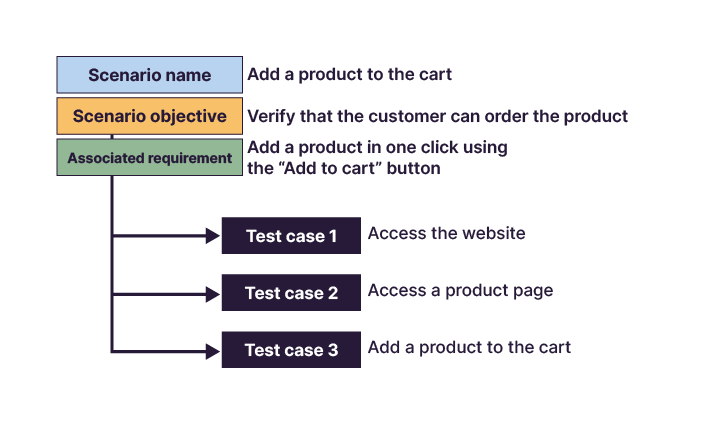
Assemble Your Test Cases
It’s time to assemble the test cases to form the scenario.
By defining your scenario needs, you’ve already done most of the work great job! 🙂
The association of test cases should allow you to validate requirements while following behavior that mirrors what a real user would do.
The key element is to define the execution order of the test cases so the scenario can reach its Goal.
In our example, the test-case needs are:
Case: Access the cart.
Case: Access a product page.
Case: Access the website.
Case: Add a product to the cart.
Putting them back into a user-appropriate order gives:
Access the website.
Access a product page.
Add a product to the cart.
Access the cart.
In practice, writing test cases and assembling scenarios can happen in parallel. New scenario ideas may emerge feel free to move back and forth between steps.
Check Your Requirements Coverage
Once your test cases are written and scenarios assembled, make sure all requirements are covered.
A single requirement may link to several test cases and a test case may cover multiple requirements.
There’s no secret technique for this. If your test-management tool can generate a coverage report, you’ll save significant time. Otherwise, a manual check is unavoidable—but well worth the effort.
A requirements coverage report verifies whether all requirements are associated with at least one test case. It can be produced during design or execution and indicates whether requirements are tested, validated, failed, or still being validated.
The first test-strategy and design topic I was assigned could have ended far less gloriously.
Our client was launching a mobile app with features similar to the website. It was a large project with tight deadlines and no extra staffing. I was assigned the “Accessibility and Navigation” scope—arguably the best part.
Back then (early 2010s), our test books were Excel spreadsheets. So checking requirement coverage had to be done manually.
I imported the requirements, wrote the test cases, assembled the scenarios, and checked my coverage.
I saw no issues, and a peer review was planned since it was my first project.
Thankfully! My colleague noticed one requirement wasn’t covered—and that I hadn’t written any test case to verify it. A complete miss.
Over to You!

Context
In the Test Management Tool, the test cases have been updated or created.
You now need to assemble them to form the scenarios you defined:
Register an order for an authenticated customer.
Cancel an order entry.
Check the
t_ordertable.Check order tracking.
These scenarios were imagined at the beginning of the Test Strategy. With hindsight, you may now be able to merge some of them.
Instructions
Assemble your test cases to build the scenarios.
Summary
A scenario is a sequence of test cases organized chronologically to verify one or more Goals.
Two helpful techniques for refining scenarios are boundary testing and combination testing.
Organize your test cases in a precise execution order to let the tester reach the conditions required to validate the Goal.
Ensure your requirements are fully covered by linking each one to at least one test case.
Your test book is now ready. Next, let’s look at how to present it.
