Determine the Resources Needed for Your Strategy

Determining the resources you need is a bit like collaborative cooking. Picture your team gathered around the stove, planning and preparing your Test Strategy. Your resources will be both human and material, and you’ll rely on them to achieve the project’s goals.
Let’s take a closer look at each one.
The available Means can vary from one project to another, even within the same organization. They may depend on project complexity, budget, and team skills. Here are some of the most frequently used Resources:
Testers: your peers and colleagues. These are the key Resources that will drive the project to success.
At this stage of the Test Strategy, you know the project Scope, its constraints, and its complexity.
Take inventory of the skills you’ll need, and check whether your colleagues have them.
Skills: Identify the training your team may need to develop the competencies required for the project:
Testing techniques:
E.g.: How to design or execute automated tests.
Technical skills:
SQL.
REST APIs.
Functional skills:
Useful when the functional domain is new to the team or deals with a new Scope.
Test Tools: these tools allow you to:
Manage your manual or automated test assets,
Define your test campaign,
Manage defects,
Generate reports.
Test data: the information needed to run your tests. This may include:
Data sets (customer accounts, credit card numbers, etc.). Royalty-free / public domain.
Data stored in a database.
Test environments: environments that reproduce the company’s IT system.
They allow you to run your campaign on a version of the application before deploying it to production.
You can simulate the target ecosystem the application will eventually evolve into.
These are isolated environments where you can perform “all” the tests you need without impacting end users.
Depending on the company, several test environments may be available.
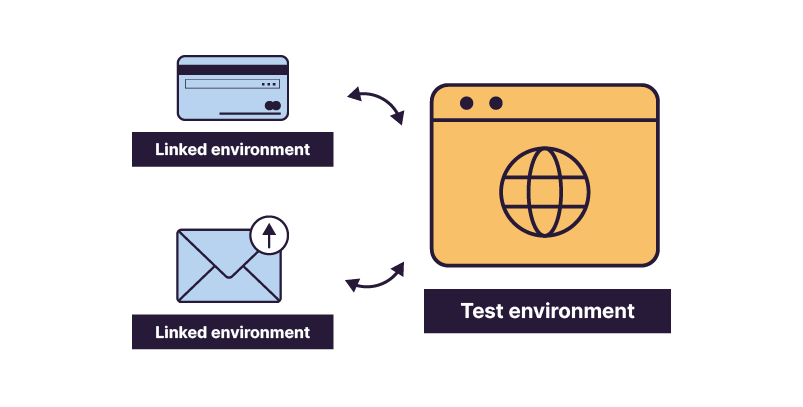
Some features may rely on external specialized partners—for example, payment processing subject to strict security rules. Your test environment will therefore connect to a related environment managed by the partner.
Choose the Resources
Here are the steps I recommend following to determine which resources to allocate to your project:
Project complexity: A complex project may require a larger team with more diverse skills to cover all test cases.
Environment constraints: Your project may not be the only one running. Another project—scheduled for a different production date—may be sharing your environment. Make sure both projects can coexist. Otherwise, one of you will need to move to a different test environment.
Team size vs. number of tests: If many features are involved, adjust your test team accordingly.
Be careful: simply adding more testers does not guarantee faster progress.
There may be many tests to execute, but check whether they can run in parallel.
If only two scenarios can run simultaneously, three testers may end up waiting.
Ask yourself whether each tester will be able to work full-time.
Budget and time constraints: This includes delivery deadlines and the allocated budget.
Take all these elements into account so you can reach a balanced decision and achieve your Goal.
Over to You!

Context
To build your Test Strategy, you’ll need to determine which Resources to allocate.
To do this, you speak with several colleagues whose input will help you make your decisions.
You begin with José, who manages environments. Here are the Notes you captured from the discussion:
Test environment number 1 (ENV-1) will be under maintenance for the entire duration of your campaign.
Environment number 2 (ENV-2) will be available. You’ll just need to request deployment before testing begins.
You then speak with Andy to learn about his availability and identify the skills required for the project:
Resource availability:
You: you have 2 days off scheduled during the execution phase, for a long weekend.
Andy: he will be on vacation for 2 weeks and is assigned to another project when he returns.
Required skills:
You and Andy identified a need for basic SQL knowledge to test table creation and data displayed in the GUI.
You both have these skills.
No specific skills are required for the UI portion.
Test tools:
You heard that another team is experimenting with a new test management tool, but it is not yet the official company tool.
The company’s test tool, Excel, already contains the test assets.
Test data:
With the DUPONT data set, all tests can be covered.
Instructions
Determine the list of Resources to allocate, and justify your choices.
Summary
Take inventory of all available Resources—they may vary from project to project.
Your peers and testers are your key Resources—don’t overlook them. Pay close attention to their skills and adjust their technical and functional knowledge as needed.
Your choices depend on the project and its timeline. Consider both facilitators and constraints to make decisions that will help you successfully complete the project.
You’ve defined your scenarios, chosen your test methods, and selected your Resources. Let’s move on to planning the steps of your Test Strategy in the next chapter.
