Discover Containerization
Your CEO Liam approached you this morning:
I’ve heard about a new technology: Docker. It looks like this is what’s going to replace virtual machines in the coming years!
And lucky you—he’s just tasked you with preparing for the future deployment of the company’s new SaaS project (codename: Libra, a secure document-sharing system for lawyers). It’s your big day!
Distinguish Between Containerization and Virtualization
Before diving into the world of containerization and Docker, it’s essential to understand how this technology differs from virtualization, a long-established method for isolating applications and operating systems.
Both techniques aim to maximize hardware utilization, but they differ fundamentally in their approach and their advantages.
The Virtualization Approach
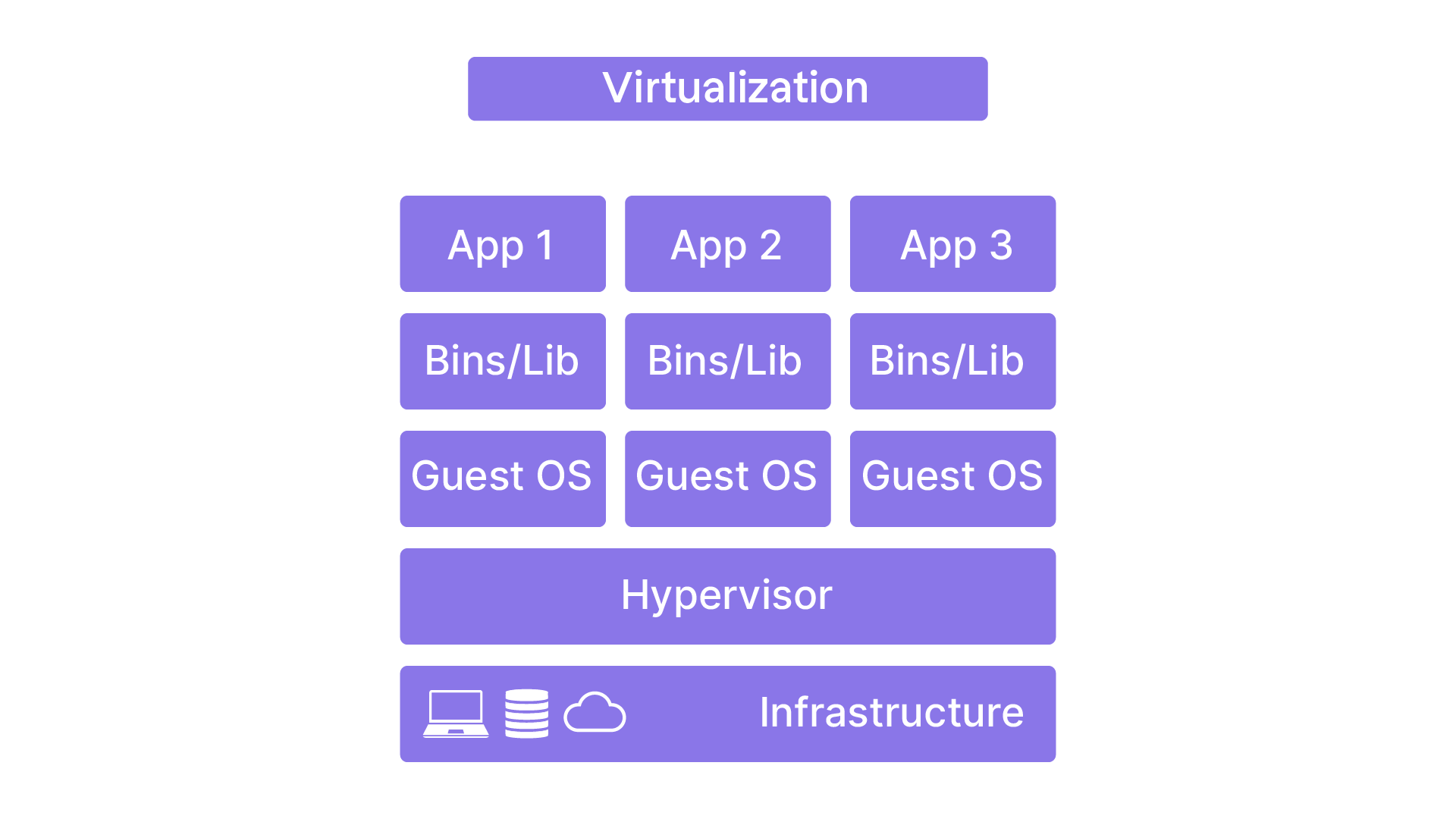
Virtualization is a technology that enables you to create multiple virtual machines (VMs) on a single physical server. Each VM operates as an independent machine with its own operating system, applications, and dedicated resources.
How It Works
The key to virtualization is the hypervisor, the software layer that creates and manages virtual machines. There are two types:
Type 1 hypervisor (“bare metal”): Runs directly on the hardware. Examples include VMware ESXi, Microsoft Hyper-V, and Xen.
Type 2 hypervisor (“hosted”): Runs on top of a host operating system. Examples include VMware Workstation and Oracle VM VirtualBox.
From an isolation standpoint, each VM is completely separate from the others. It has its own OS and its own dedicated storage.
Finally, resources (CPU, RAM, etc.) are assigned to each VM using fixed allocations.
The Containerization Technique
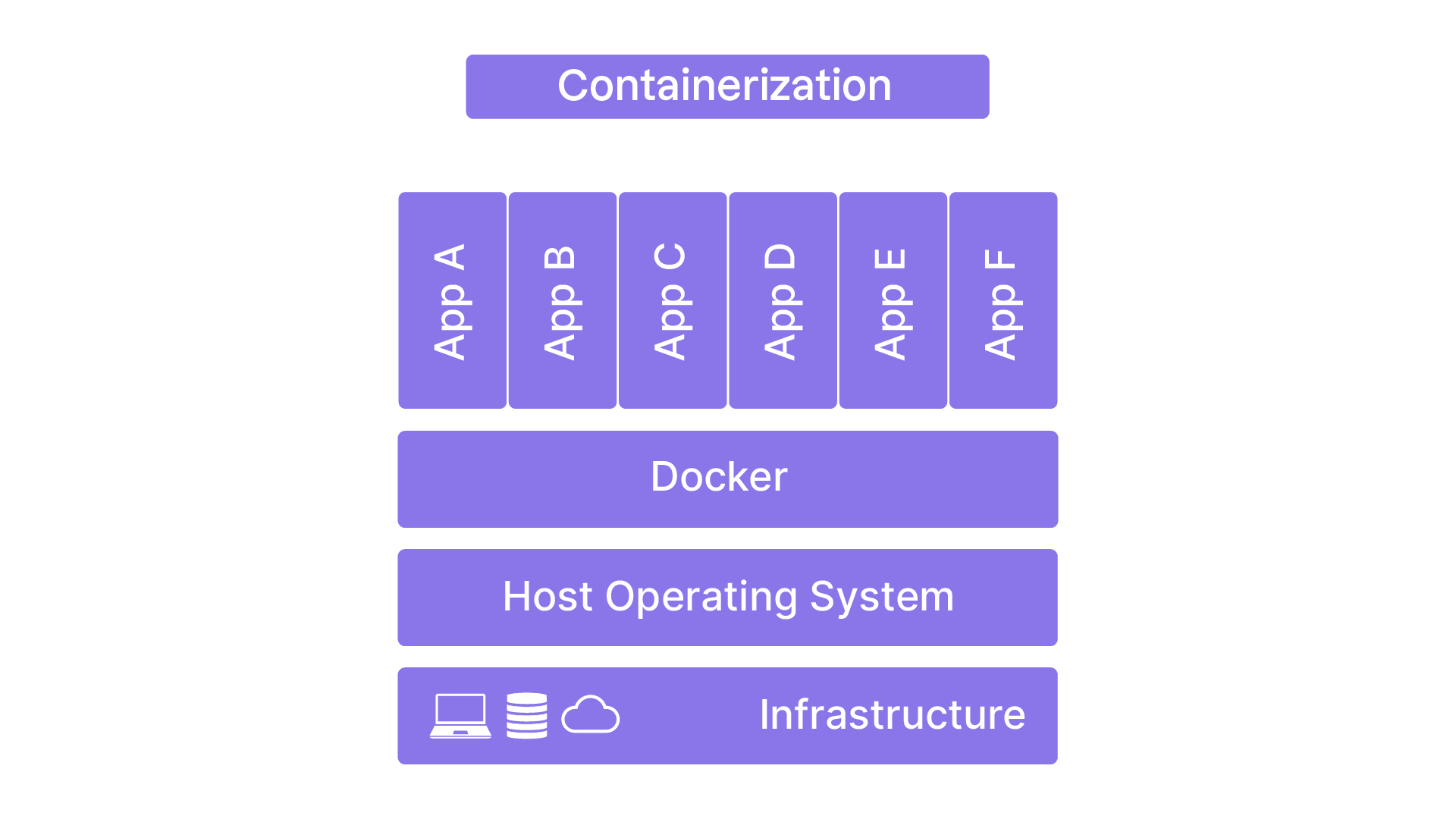
Containerization is a technique used to create “containers” groups of one or more processes—that share the same operating system kernel but run in isolation from each other.
How It Works
Containers are managed using containerization engines like Docker. These engines rely on Linux kernel capabilities such as cgroups and namespaces to isolate and control resources.
And what about Microsoft Windows?
Although containerization originated in the Unix world, the Microsoft Windows kernel now also provides process-isolation features that allow Windows containers to run on Windows hosts. A Windows host can also run GNU/Linux containers via WSL2.
Wi
With respect to isolation, and unlike virtual machines, containers share the same system kernel but are isolated at the process, network, and file-system levels.
Therefore, two virtual machines on the same host each run their own kernel and access hardware resources through abstraction layers. This results in higher baseline resource usage compared with containers running in an identical deployment topology.
Furthermore once again unlike virtual machines containers share host system resources, enabling more dynamic and efficient resource management.
Advantages and Disadvantages
Let’s compare the main characteristics offered by these two technologies:
Aspect | Virtualization | Containerization |
Isolation | Complete (each VM has its own OS) | Partial (shared kernel) |
Resources | More demanding (resources are dedicated per VM) | More efficient (resources are shared) |
Performance | Slow startup (each VM must boot its OS) | Fast startup (container processes run directly on launch) |
Host system flexibility | High (each VM can run a different OS) | Limited (containers share the same kernel) |
And what should I conclude from this?
Great question! Virtualization is best suited for scenarios requiring complete isolation and substantial OS flexibility for example when deploying a cloud-based “remote office” solution.
Containerization, however, shines in environments requiring high deployment agility—such as applications experiencing significant load spikes of varying duration, which is a defining characteristic of many web applications.
The company’s new project, Libra, fits perfectly into this category! Let’s now take a closer look at how containers actually work.
Understand How Containers Work
To fully understand container behavior, it’s crucial to become familiar with two foundational concepts: cgroups (control groups) and namespaces. These Linux kernel capabilities are used to manage resources and enforce container isolation.
The cgroups (control groups)
cgroups, or control groups, are a Linux kernel feature that lets you limit, prioritize, and isolate the use of resources (CPU, memory, disk, network, etc.) for groups of processes.
This mechanism is essential for ensuring that each container has the resources it needs without interfering with the others.
How It Works
Allocation: cgroups allow specific quotas of CPU, memory, and other resources to be assigned to each container. For example, a cgroup can be configured to limit a container to 2 GB of RAM and one CPU core.
Prioritization: cgroups can prioritize resource access, giving certain containers preferential allocation when needed.
Monitoring: cgroups provide monitoring capabilities so administrators can track resource usage and take corrective action if necessary.
Let’s assume the Libra environment consists of three services, each running in its own container:
An HTTP server acting as a reverse proxy
The Libra application itself
A file-storage server
If you had a server with 12 GB RAM and 8 CPUs, cgroups would allow you to:
Limit the first container to 4 GB RAM and 3 CPUs
Limit the second container to 2 GB RAM and 2 CPUs
Limit the last container to 4 GB RAM and 2 CPUs
By allocating resources carefully, you ensure your containers operate in a stable but controlled environment, reducing the risk of runaway processes.
But isn’t that 12 GB of RAM and 8 CPUs!?
Good catch! It’s always wise to reserve some resources for the host system; otherwise, it won’t be able to function properly. Always remember to leave room for the host!
Namespaces
Namespaces are another Linux kernel feature that isolates groups of processes from system resources. Each namespace provides an independent view of specific system components such as processes, networks, mount points, and more.
How It Works
Process isolation: Each container runs in its own process namespace, meaning it can only see its own processes—not the host’s or other containers’.
File-system isolation: Each container may have its own isolated file system.
Network isolation: Network namespaces allow each container to have independent network interfaces, enabling private networks between containers.
Mount-point isolation: Each container can have its own mount points that are independent of the host system.
Returning to the Libra environment mentioned earlier, we could, for example:
Use the same network namespace for the Libra application container and the HTTP server container, ensuring that Libra can only be accessed through its reverse proxy—not directly.
Use a dedicated mount namespace for the file-storage container to access a file system containing sensitive data, limiting the risk of unauthorized access if the Libra application were compromised.
cgroups and namespaces form the foundation of containerization. On one hand, cgroups provide fine-grained resource-quota management; on the other, namespaces offer robust isolation across processes, file systems, and networks.
Together, they form the central pillar—and the first line of defense of your containerized infrastructure.
.
Now that you’re familiar with the two technological pillars behind containers, let’s take a closer look at Docker the containerization engine.
Discover Docker
Docker has revolutionized containerization by simplifying the creation, deployment, and management of containerized applications. Since its introduction, Docker has not only popularized container usage but has also helped build a rich and dynamic ecosystem.
Docker was launched in 2013 by Solomon Hykes under the dotCloud company (later renamed Docker Inc.). Before Docker, containerization already existed in various forms but was complex and mostly limited to large enterprises or specialized environments.
Containers before Docker?
Although Docker played a major role in popularizing containers, the technology dates back much earlier in the history of computing.
The real revolution introduced by Docker was not technological it was about dramatically improving the user experience.
Main Components
Docker is made up of several technical building blocks that work together to provide a complete containerization solution. Understanding these components is essential for learning how Docker operates and how it can be used to develop, deploy, and manage containerized applications.
Component | Description: Docker Engine |
Docker Engine | The Docker Engine is the heart of the platform. It creates, runs, and manages containers. It is made up of:
|
Docker Images | Docker images are immutable archives containing everything an application needs to run: code, libraries, and dependencies. |
Docker Hub | Docker Hub is a platform for storing, sharing, and discovering Docker images. |
Docker Swarm | Docker Swarm is an orchestration tool for managing clusters of Docker hosts. It lets you group multiple machines into a single cluster, simplifying large-scale container orchestration. |
By combining simplicity with a rich ecosystem, Docker sparked the massive industry migration toward containerization technologies.
This adoption wave quickly transformed into a standardization effort, now embodied by the Open Container Initiative (OCI), which we’re about to explore together.
Explore the Container Standardization Approach
The rise of containerization highlighted the need for open standards to guarantee portability and interoperability across platforms and tools.
Major technology players (Google, Microsoft, Red Hat, etc.) and open-source communities have pushed toward container standardization, culminating in initiatives like the Open Container Initiative (OCI).
In the context of containers, open standards aim to define standardized formats and execution environments so containers built with one tool can run using another compatible tool.
And what about the others?
Today, a wide variety of tools exist for running containers. If you want to explore alternatives, look into Podman or runc. Observant users may notice a fundamental difference from Docker… Give up?
Among other things, these tools do not use a client/server architecture like Docker, which can provide potential additional guarantees concerning their security model.
The Open Container Initiative aims to:
Ensure interoperability: Standards allow different tools to operate consistently, even when developed independently—or competitively.
Promote portability: Any OCI-compliant image can run on any OCI-compatible platform.
Simplify adoption: Standardization reduces complexity for developers and operators, encouraging wider use of container technologies.
Docker is fully aligned with this international initiative, and the entire Docker ecosystem is compatible with OCI specifications.
By adopting Docker, companies and developers face no risk of technological lock-in. On the contrary, OCI standardization ensures easier migration from one provider to another.
Over to You!

Context
Liam has asked you to study the differences between containerization and virtualization to determine which technology is best suited for deploying Libra, the company’s new flagship application.
Here’s the description of the application you’ve been given:
Libra is a SaaS web application designed to meet the security and ease-of-use needs of lawyers and legal professionals. Its primary goal is to simplify the transfer of encrypted documents between parties, ensuring the confidentiality and integrity of sensitive information.
Main Features:
Intuitive, user-friendly interface
Document sharing in just a few clicks
Lifecycle system with ephemeral storage
Application started and destroyed on demand
Automatic deletion of documents after access
Integration of state-of-the-art encryption technologies
Instructions
Create a comparison table listing the advantages and disadvantages of virtualization and containerization for deploying the Libra application.
Check your work using this sample answer.
Technology | Advantages | Disadvantages |
Virtualization |
|
|
Containerization |
|
|
Containerization wins (4 points) over virtualization (0 points).
Summary
Containerization uses lightweight containers that share the host OS kernel, while virtualization creates virtual machines with their own full OS.
cgroups manage the resources allocated to containers, and namespaces ensure their isolation across processes and system resources.
Docker simplifies containerization with components such as Docker Engine, Docker Images, Docker Containers, Docker Compose, and Docker Swarm.
The Open Container Initiative (OCI) establishes open standards for container interoperability, which Docker follows to avoid technology lock-in.
Now that you understand the theory behind containerization and Docker, let’s move on to hands-on practice!