Scale Up With Docker Swarm
Arriving at the office, you notice a new message from Sarah waiting in the company chat:
Hello! I’ve just finished estimating infrastructure costs based on the expected load. We won’t be able to afford RAM/CPU resources if we try to run everything on a single machine… We’ll need to spread the load across several smaller machines—that would be much more affordable.
Fortunately, you already know the solution: Docker Swarm!
In this chapter, we’ll explore Docker Swarm, a native Docker feature used to manage container clusters—and a powerful tool for scaling your containerized applications.
Mastering Swarm will strengthen your ability to handle increasing load and improve service resilience.
Discover Docker Swarm
Docker Swarm lets you group several Docker hosts into a cluster and manage them centrally.
A cluster?
A cluster is a group of interconnected machines or servers that work together to accomplish a common task. Its main goals are increased performance, high availability, and redundancy.
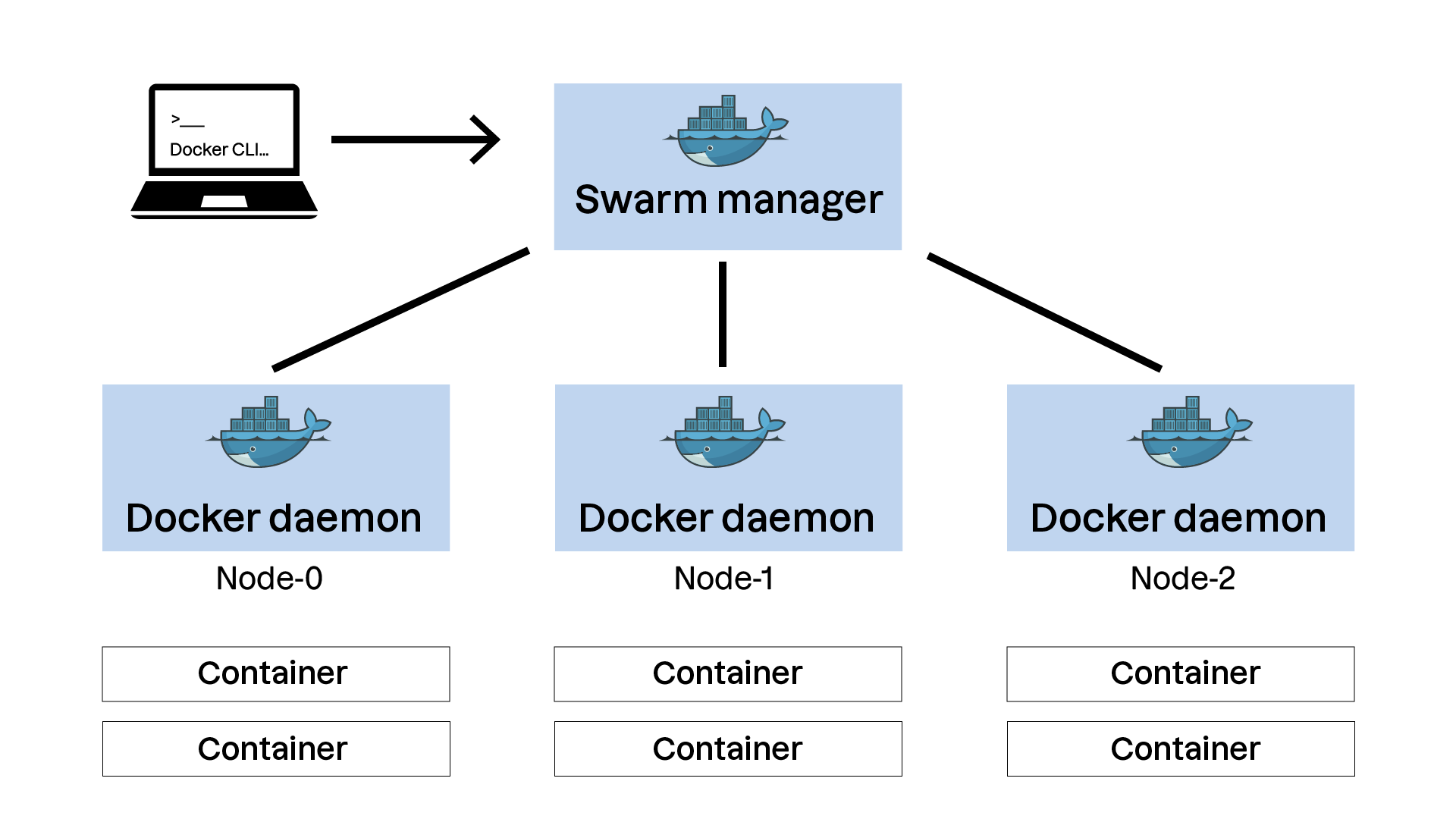
A Docker Swarm cluster is made up of multiple nodes, each running the Docker engine. There are two types of nodes:
Manager nodes:
They maintain the cluster’s global state and make decisions about service deployment and management.
They can also run containers, though their primary responsibility is cluster management.
To ensure high availability, use an odd number of manager nodes (at least 3).
Worker nodes:
They run containers and carry out instructions from the manager nodes.
They do not make management decisions.
The Docker client is then used to send commands to a manager node, which translates them into operations executed across the cluster.
And what about security?
Communication between nodes is secured via TLS certificates, automatically generated when the cluster is initialized. This ensures that only authorized machines can join and interact with the cluster. When adding a node, a single-use token authenticates the new participant.
Conceptually, Docker Swarm revolves around three main features:
A declarative model
With Docker Swarm, you define the desired state of your application using a configuration file—often a Docker Compose file. Docker Swarm’s job is then to maintain that state.
This declarative model follows three principles:
Declaration: You describe services, networks, and volumes in a configuration file.
Orchestration: Docker Swarm deploys and manages services to match that declaration.
Self-healing: If something fails, Swarm automatically restores the desired state.
An Overlay Network
Docker Swarm uses an overlay network to enable secure communication between containers running on different hosts in the cluster. This network is created automatically when the Swarm cluster is initialized. Services communicate through virtual networks independently of the physical host running them.
This provides several benefits:
Network isolation: Each service can have its own isolated network.
Security: Container-to-container traffic can be encrypted at the overlay network level.
Simplicity: Containers can be redistributed across hosts without manual network reconfiguration.
Rolling updates
Rolling updates are a core feature of Docker Swarm. They allow services to be updated without downtime by gradually deploying new container versions and retiring old ones. Benefits include:
Gradual rollout: Updates occur in stages to avoid full outages.
Control: You choose how many containers update simultaneously.
Rollback: If needed, return to the previous version instantly.
Now let’s apply theory to practice—time to create your first Swarm cluster!
Create Your First Swarm Cluster
This video walks through cluster initialization and key management commands. Let’s go!
In this video, we explored:
1/ Initializing a Swarm cluster:
docker swarm init
2/ Generating an authentication token to add a worker node:
docker swarm join-token worker
3/ Joining a node to the cluster:
docker swarm join --token <worker-token> <manager-ip>:2377
4/ Listing cluster nodes:
docker node ls
5/ Inspecting a specific node:
docker node inspect <node-id>
Now that your cluster is ready, let’s adapt our first application environment and deploy it!
Deploy a Compose Stack on Your Cluster
A Swarm “stack” is also defined using adocker-compose.ymlfile, with additional sections for cluster deployment.
Here’s an example:
services:
  web:
    image: myapp:1.0
    deploy:
      replicas: 3
      update_config:
        parallelism: 1
        delay: 10s
      restart_policy:
        condition: on-failure
    ports:
      - "80:80"
In this example:
The
webservice uses themyapp:1.0image.It deploys 3 replicas, meaning three instances are distributed across the Swarm cluster for potential load balancing.
Rolling updates are configured to update one container at a time (
parallelism: 1) with a 10-second delay between updates (delay: 10s).The
restart_policyinstructs Swarm to restart containers on failure.
As you can see, a Swarm-compatible Compose file is very similar to a standard Compose file. The extra instructions describe how the container engine should manage deployment across multiple machines.
Let’s deploy this environment on our cluster! The next video introduces the necessary commands.
In this video, we learned:
1/ How to deploy a stack:
docker stack deploy -c docker-compose.yml <stack-name>
2/ How to list deployed stacks:
docker stack ls
3/ How to list tasks (containers) running in a stack:
docker stack ps <stack-name>
4/ How to remove a stack:
docker stack rm <stack-name>
You can now deploy containerized applications that scale to high user volumes thanks to Docker Swarm!
Over to You!

Context
Sarah emails you to say the virtual machines are ready for the Docker Swarm deployment experiment!
In her message, you find SSH login details along with:
Here you go at Liam’s request, here are 3 machines ready to test cluster creation and deploy Libra on it. Your SSH key is already installed on the
operatoraccount; it’s asudoer.Let us know once deployment is complete and take notes so we can reproduce it later!
For this exercise, you’ll initialize your own Docker Swarm cluster on a virtualized infrastructure.
Instructions
Initiate a Docker Swarm cluster using the environment provided on this GitHub repository.
Adapt the
docker-compose.ymlfile created in Chapter 3 so it can be used on a Swarm cluster. In particular:The Libra application should run 3 instances.
Parallelism for the rolling update must be set to 1.
The update delay should be 5 minutes.
Deploy the environment on your Swarm cluster.
Verify the deployment by inspecting tasks running on the Swarm cluster using the appropriate commands.
Summary
A Swarm cluster includes manager nodes (cluster state management) and worker nodes (container execution), enabling efficient orchestration.
A “stack” defines a desired state in a configuration file, and Docker Swarm maintains that state automatically for continuity and self-healing.
Docker Swarm uses an overlay network for secure, isolated communication between containers across multiple hosts.
Rolling updates enable continuous application upgrades by deploying new versions progressively while minimizing downtime.
At this stage, you already have a solid understanding of Docker’s core features and how to deploy your own applications as containers.
Now it’s time for the next step: making your deployments more reliable and optimized. But before that, try the quiz that concludes this section.