Apply the Strategy Appropriate to Your Scope

Define Data Classification
As you can imagine, when it comes to data, not all of it is equally critical to the business. Some data is even vital and could put the company at risk if lost.
From a high-level (“macro”) perspective, the backup policy defines the backup strategies to apply based on the criticality of the data. Once again, it is the responsibility of the backup administrator—whether a system administrator or IT technician—to apply these strategies at an operational (“micro”) level.
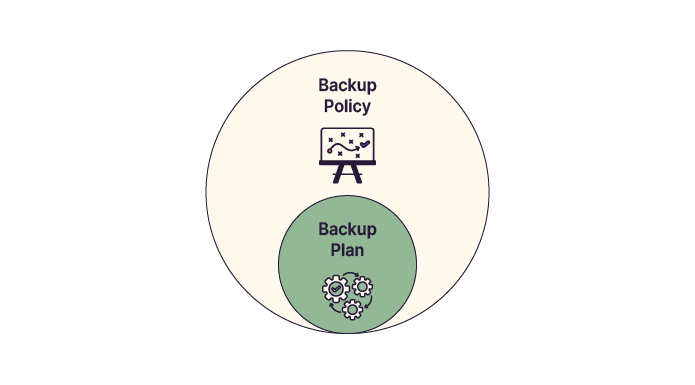
As part of this audit, it is also your role to verify that the backup policy is consistent and to analyze which data is critical and which is not.
Assessing data criticality is not an exact science, and many criteria must be taken into account.
However, by asking yourself the following questions, you can start to form clear answers:
Is this data necessary for the company’s operations, or even its survival? For example, research results from a biochemistry lab are critical. The same applies to the 3D models of an offshore wind turbine your startup is developing—losing them could mean losing years of work and innovation.
Is this data subject to legal obligations? Accounting documents, for example, must be retained by law.
Can this data be recovered or regenerated in another way? A non-production test server can usually be rebuilt from another environment and is therefore less critical.
These questions help define data criticality and directly influence how backups should be managed.
So if Mickael accidentally lost legally required data, it was de facto critical. Is that correct?
Exactly—you’ve got it. While this isn’t an exact science, it relies heavily on operational logic.
Once you’ve determined which data is critical and which is not, you can move on to more practical considerations such as backup frequency, retention periods, and archiving duration.
Data classification also includes confidentiality requirements. Some data is confidential, some is restricted to specific roles, some is strictly internal, and some is public. The backup policy must define how each confidentiality level is handled—in practice, this often means enforcing backup encryption.
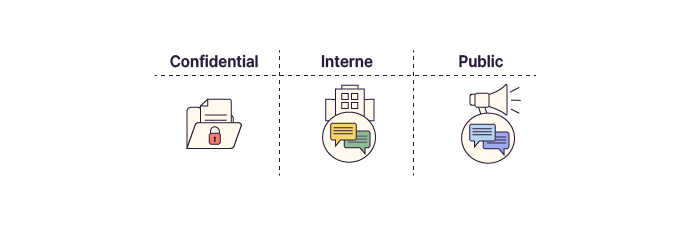
In the backup policy of the company you are auditing, several classification levels are defined:
Critical: Data is vital to the business. It has a retention period of two months, long-term archiving set to ten years, and requires remote replication. Backup integrity and restore capability are tested quarterly.
Normal: Data enables optimal business operations. It is backed up daily with a retention period of one month. Archiving is planned for five years.
Low: Backups are not required. Data is volatile or can be quickly regenerated.
For each dataset, each criticality level defines:
whether it needs to be backed up;
the backup frequency;
the retention period;
the archiving strategy;
the storage media;
the security requirements.
Looking back at the example of the accounting application used by Juliette, one of Mickael’s colleagues, we obtain the following table:
Level | Criticality | Impact of Loss | Recovery Effort |
Critical | Maximum | Business operations halted; probable financial loss | High, restrictive, and resource-intensive |
Normal | Medium | Operational slowdown; possible but limited financial impact | Medium |
Low | Low | Negligible impact; volatile data | Low |
Once you’ve completed this analysis for all company data, you’ll have a full classification—and be able to apply the appropriate backup strategies.
Set Backup Frequency
You saw earlier that Coffecao’s backup policy clearly defines data classification.
This policy also needs to specify how frequently each category of data must be backed up.
I thought we also needed backup windows to plan this properly—don’t we?
You’re absolutely right. To define schedules and backup frequencies, you must take into account available backup windows as well as backup methods (full, incremental, or differential).
Combining all this information allows you to determine precisely:
what to back up;
when to back up;
how to back up;
where to store backups.
As a semi-industrial group, Coffecao does not operate at night or on weekends. This gives you a backup window every day from 9:00 p.m. to 6:00 a.m., plus full weekends.
A typical schedule might look like this:
One full backup per week, usually on weekends;
Daily incremental backups running Monday through Friday.
Synthetic backups can also be used to shift the impact from production storage to backup storage.
Determine Backup Retention Periods
While Coffecao’s backup policy clearly defines data classification, it does not specify how long backups must remain available. This decision directly affects restoration speed.
Retention periods define how long backed-up data remains available on the backup storage system.
For critical hygiene compliance data, the backup plan may specify:
Daily backups;
One full backup per week and five incremental backups per week;
A backup window from 9:00 p.m. to 6:00 a.m. plus weekends;
A retention period of 30 days.
After the retention period, data is not deleted—it is archived.
Understand Long-Term Archiving
Long-term archiving prioritizes data durability over rapid recovery. Since the need to restore data decreases as it ages, keeping every single backup indefinitely is unnecessary.
To manage this efficiently, organizations use rotation schemes like GFS (Grandfather-Father-Son) to balance storage costs with data retention needs.
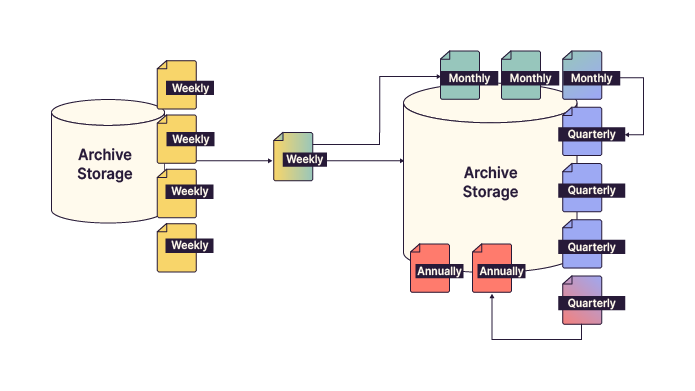
This approach drastically reduces storage requirements while preserving long-term data availability.
Over to You!

Context
Following your work on Coffecao’s backup policy, EthicalIT has asked you to revise its own backup policy. The CIO would like to involve you as an expert in drafting it.
Based on the file server structure, analyze the data types and, for each one, define its criticality, backup frequency, and retention period.
Guidelines
Analyze the data based on file and folder names to determine its criticality.
Propose and justify a backup frequency for each criticality level.
Define and justify a retention period for each level.
Summary
Data classification defines the criticality of data.
It is defined by the CIO, IT security teams, and business stakeholders.
The backup policy defines frequency, retention, and archiving strategies.
Long-term archiving optimizes storage by retaining fewer backups over time.
This is really coming together! In the next chapter, we’ll look at how much storage space your backups might require.
