Integrate Security into Your Backup Strategy

Understand the Importance of IT Security
Backups contain sensitive, confidential data. They play a critical role in a business’s ability to survive a disaster or a malware attack.
Coffecao’s hygiene production reports include legally required records and are critical for business operations. And as you might expect, they’re not the only ones. Legally, all businesses must retain certain types of data for several years.
So in your audit and recommendations, you’ll need to address backup security.
Do I just need to set a strong password on the servers?
That would be a good start, yes—but it’s far from sufficient. Don’t limit your view of backups to the data alone. Take the entire data “ecosystem” into account.
For example, here are a few areas that must be secured:
Physical and remote access:
Servers and storage systems. A server room open to everyone should not exist.
Tools. No access to backup scripts and no generic Veeam account.
Backup files. Backed-up data must remain intact and must not be accessible except through the restore tool.
Administrator and technician permissions:
Only people who directly manage backup tools should have access to them. That means no accounts for system or network admins who don’t need to work on backups.
Disable access immediately for employees leaving the company. Don’t wait until tomorrow—procrastination is one of security’s worst enemies.
Outsourced backups. You won’t be able to walk into an AWS server room to verify physical security, of course. But you are responsible for ensuring remote access is properly secured—and for confirming the provider is trustworthy.
Understand the Value of Encryption
You may not realize it yet, but in IT security, settling for the bare minimum is a recipe for disaster. So yes, using a strong password for the backup storage server is good—but it’s not enough.
Coffecao’s backup files contain all of its critical data:
administrator and user accounts;
mailboxes;
business applications: accounting, invoicing, company know-how, production, factory machine settings;
file shares;
etc.
Imagine someone with malicious intent steals the backups. They restore the data elsewhere and eventually find the recipe for the salted butter caramel chocolate bar your company is famous for. If that recipe is stolen, it could be a major problem for the business.
Now imagine that even if backups were stolen, nothing would be usable. That’s exactly what encryption can make possible.
How and where can I apply encryption?
There are three levers you can use:
Data-at-rest encryption(Data-at-rest encryption): By default, backup data is not encrypted. If you encrypt it, it cannot be read if stolen.
Encryption in transit(Data-in-transit encryption): Data transferred over the network (for example, from a source server to the backup storage server) must not be sent in plaintext. This prevents risks such as MITM (Man-in-the-Middle) attacks, where an attacker intercepts traffic and captures data packets.
Storage media encryption(Media-level encryption): If an attacker gains physical access to disks and steals them, the data remains unusable because it is encrypted at the partition level—or at the tape level in the case of LTO cartridges.
The good news is that these three layers can be combined. In fact, if possible, you should use all three at the same time.
If you use a script-based solution, you’ll need to implement encryption before transfer. For secure transfer (SSL/TLS), there are many tools available—or native capabilities, such as those supported by rsync.
For media encryption, several options exist. Devices such as LTO libraries support built-in encryption. You can also encrypt the partition that stores the data using tools provided by the storage system.
Regardless of the method used, you must also back up the encryption key, preferably using different tools and media than your backups.
Access to the key must be restricted to authorized personnel only. After all, it unlocks access to your backups and their contents.
Finally, the key is essential—but the encryption algorithm is also required for decryption, which further increases the difficulty for an attacker.
Differentiate Between a Business Continuity Plan and a Disaster Recovery Plan
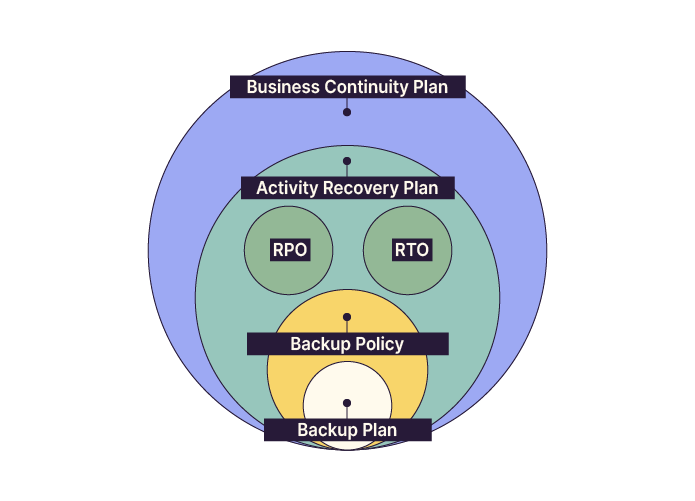
BCP: Business Continuity Plan
At a high level, the BCP includes all measures required to maintain essential services and critical operations, followed by a planned resumption of activities.
That’s the basic idea, but let’s go a bit further.
The BCP applies in the event of a disaster or major incident. Its goal is to return as quickly as possible to a normal or degraded operating mode while preventing business harm.
As you can imagine, this goal should be as short as possible.
Here are a few levers you can use to strengthen your BCP, also referenced in the French Ministry of the Economy guide:
Analyze your system and network architecture and identify sensitive areas.
Ensure critical equipment is redundant.
Eliminate single points of failure (SPOFs).
Implement spanning tree to improve fault tolerance.
Build, train, and prepare all stakeholders involved in continuity (technical teams, leadership, application owners, etc.).
Automate as much as possible.
DRP: Disaster Recovery Plan
A DRP applies when one or more systems are completely down.
Here are a few examples of situations that could trigger a DRP:
A complete outage of a server room or site due to an electrical issue.
An external attack, whether ransomware, hacking, or other incidents.
In these cases, backups become absolutely essential.
A properly designed backup system is tested regularly. Restore time is known, and so is reliability.
It becomes possible to redeploy lost or corrupted data into another environment that can replace the impacted one.
Like the BCP, a DRP typically includes:
The Recovery Point Objective (RPO) and Recovery Time Objective (RTO), which define recovery objectives.
An inventory of critical resources.
The backup policy and the associated backup plan.
A recovery site (for example, identified or reserved infrastructure in another location).
A schedule for testing backups and performing restore drills.
Documentation of critical components.
This list is not exhaustive. You could also plan “dress rehearsals” for ransomware scenarios.
Another function of the DRP is to define the restoration sequence. Not all systems should be restored and restarted at the same time, so a clear logical order must be defined.
Recovery Objectives
In IT infrastructure and backups, planning means preparing for failures (hardware or software) and disasters: power outages, server room fires, widespread attacks, and more.
A DRP includes recovery objectives, defined using:
The Recovery Point Objective (RPO) and the Recovery Time Objective (RTO).
Recovery Point Objective (RPO): the maximum acceptable data loss. In other words, how much data can the business afford to lose? If losing several hours is acceptable, daily backups may be sufficient. If the RPO is one hour, backups must run hourly.
For Coffecao, the RPO can be considered 24 hours, since production runs daily.
Recovery Time Objective (RTO): the maximum acceptable downtime. It determines how long the business can remain non-operational before harm occurs.
For Coffecao, it would be ideal to keep downtime under three days. Coffecao is a semi-industrial business with perishable products that can still be stored with limited risk and without severe inventory constraints.
Now let’s look at the recommendations from two major French information security organizations.
Apply ANSSI and CNIL Recommendations
You’re nearly done with your audit at Coffecao—congratulations!
Now it’s time to draft your recommendations. And when it comes to security best practices, a strong starting point is ANSSI, France’s national cybersecurity authority.
In addition to supporting government bodies, ANSSI provides guidance to businesses and society through resources for both executives and system administrators.
On backups specifically, ANSSI has published a guide (in french) on information system backups.
In that document, you’ll find recommendations applicable to Coffecao—some familiar, and others such as:
Backup traffic must be strictly filtered by an internal firewall.
Backup traffic should run within a dedicated logical subnet.
All backup infrastructure components must be proactively updated (backup software, firmware, etc.). It is recommended to track CVEs and vendor security bulletins.
ANSSI also provides a shorter document (in french) titled “Les règles d’or de la sauvegarde”.
You can share it with Gwenaelle, Coffecao’s IT technician, so she always has best practices top of mind.
Another key organization that can provide additional security best practices is the CNIL (Commission nationale de l’informatique et des libertés).
Over to You!

Context
You and your CIO are nearing the end of the backup policy overhaul.
You have one final item to add to complete it and make it more reliable: improving security.
Fortunately, there are strong resources in this area, including two key organizations in France: ANSSI (Agence nationale de la sécurité des systèmes d’information) and CNIL (Commission nationale de l’informatique et des libertés).
Guidelines
Based on key elements from ANSSI and/or CNIL, suggest the security best practices to integrate into your backup policy.
Summary
To protect your backups, you should encrypt:
backup files (data at rest);
network traffic (data in transit);
storage media.
RTO (Recovery Time Objective) and RPO (Recovery Point Objective) define recovery targets.
A Business Continuity Plan (BCP) is designed to keep the business running during a major incident.
A Disaster Recovery Plan (DRP) defines how to restore operations as quickly as possible with minimal loss.
ANSSI and CNIL provide valuable guidance for building a solid foundation for secure backups.
You now understand the role of a backup policy, how it is designed, and how it supports disaster recovery. Next, let’s learn how to implement your backup strategy!
