Identify the Different Backup Methods

Coffee breaks are a wonderful thing! It was during one of those coffee breaks—taken exceptionally at 10:35 a.m. instead of 10:15 a.m.—that you got to know the entire Human Resources and Recruitment team.
You had the pleasure of meeting Mickael, your HR manager, and as the conversation went on, you became curious about his role and how he organizes his work.
During that coffee break, you learned that Mickael processes payroll only on the last day of the month so that employee transfers are issued on the 5th of the following month.
What do you think would happen if, on December 15, he lost his data and you only had a backup from December 1?
Well… nothing, I guess?
Exactly! And that’s a perfect example of why backup frequency planning and analysis are essential—and a great transition into the concepts of backup windows and backup frequency.
Determine the Right Backup Window
If you’re at all interested in aerospace, you’re probably familiar with the concept of a “launch window,” which refers to the time interval during which conditions are optimal for a successful rocket launch.
Well, when it comes to backups, it’s exactly the same!
Couldn’t I just consider the entire day as a backup window and schedule hourly backups of all my data so there’s no risk of loss?
Hold on! Before deciding on your backup window, there’s one key point to address first: the impact of backups on data and infrastructure.
If you need a refresher, here are the main steps involved in a backup:
The backup process is initiated by a server or a script.
Data is copied from a source to a destination: the storage medium.
The source data must be read from disk by the copy process.
Small data packets are transmitted over the network from the source to the storage server.
The packets are reassembled on the storage medium to recreate the backed-up data.
A checksum may be performed to ensure the data was not corrupted during transfer.
Each of these operations consumes CPU resources or disk I/O.
All of this inevitably slows down the system—and on a production environment, that’s not acceptable.
In addition, if backups are remote, there’s a risk of saturating network equipment and slowing down the entire infrastructure.
That’s why backups are usually scheduled at night, on weekends, or more generally during non-working hours ("off-hours").
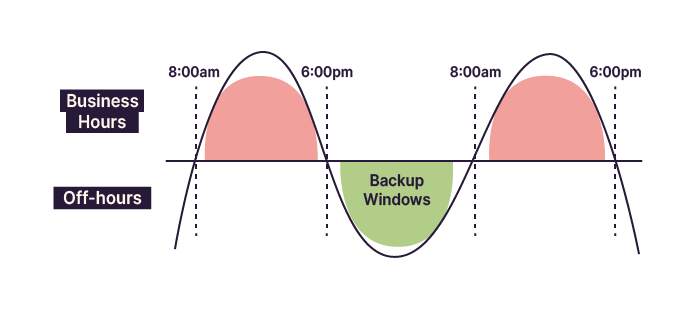
I see—but concretely, what kind of impact are we talking about?
If backups run while everyone is working, the impact can include:
High latency when opening or browsing files
Blocking operational data—some systems must be taken offline to be backed up
Very slow access to internet or intranet services, affecting the company’s image
A significant loss of overall productivity
If you back up all your data every hour, you may not even finish one backup before the next starts—and you risk paralyzing everyone’s work.
Does this help you better understand the importance of the backup window now?
Yes, it does. I’ll avoid scheduling backups during working hours—but what if I have special processing tasks at night?
That’s an excellent question—and the answer is simple: every situation is different.
It’s up to you, based on your operational constraints and available information, to define the most suitable backup window.
Not all companies have the same backup windows. Some may even have extremely limited ones.
Consider these examples:
An international banking risk management company
A dairy production company
An energy innovation startup
A shipbuilding and naval engineering facility
Each of these organizations will likely have a different backup window.
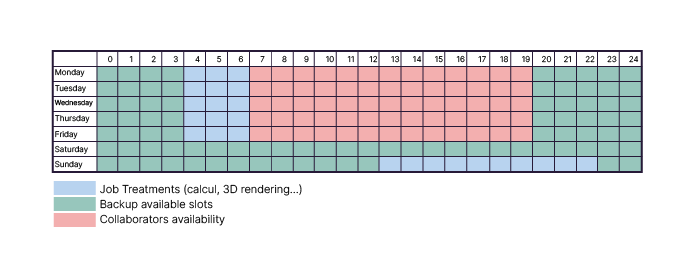
Creating a visual schedule of backup windows can help you stay organized.
Choose the Best Backup Frequency
Having an optimal backup window is important—but knowing how often to use it is essential.
Imagine your backup window runs Monday to Friday from 9 p.m. to 4 a.m., and all day Saturday and Sunday.
That doesn’t mean you should use every window for every backup.
If I back up the same 50% of my data every day, I’ll never get anywhere…
Exactly—and that’s a major risk.
Backup frequency must account for both data criticality and how often the data changes.
Discover Backup Methods
Backups require time, resources, and an available window.
So how can I realistically schedule all my backups every day?
That’s where backup methods come in.
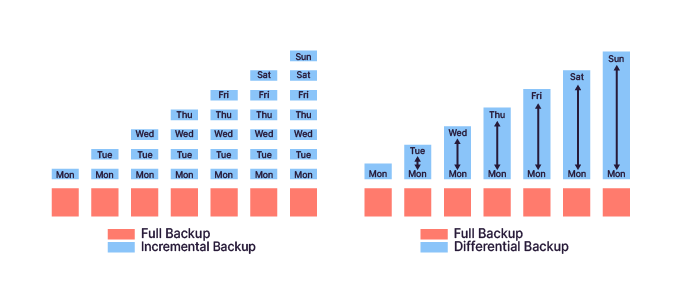
Full backup: all data is copied.
Incremental backup: only changes since the last backup are saved.
Differential backup: changes since the last full backup are saved.
Take Control of Data Replication
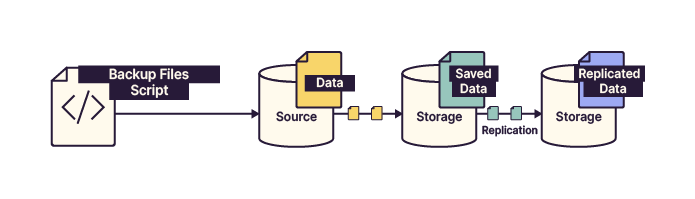
Backing up your data is essential—but backing up your backups is just as critical.
This is where data replication comes into play.
Understand the Archiving Principle
Backup storage is not infinite, and legal obligations often require data to be retained for many years.
This is why backup plans must include:
Retention periods
Backup archiving
By combining retention and archiving, you ensure long-term availability while optimizing storage usage.
Over to You!

Context
EthicalIT recently expanded internationally by acquiring a digital services company in Delhi, India.
Instructions
Propose a new backup window considering the time difference.
Propose a backup strategy suitable for geographically distributed sites.
Justify your choices in the logbook.
Summary
Backup windows and frequency must be carefully planned.
Different backup methods serve different operational needs.
Replication protects backups against catastrophic failure.
Archiving ensures compliance and long-term data availability.
Now that the fundamentals are in place, it’s time to focus on backup storage itself.
