Cleanse Your Dataset using Python
We are now going to cleanse the data set we saw in the previous chapter. We will illustrate this in Python.
We will begin by loading the sample persons.csv (which you can find here) into a variable we will call data . This variable will therefore be a dataframe.
Next, we will comb through each of the columns looking for errors, correcting them, and updating the columns accordingly. Whether you are working in Python or R, updating a column in a dataframe is performed like this:
data["name_column"] = new_columnHere, we want to replace the values of the name_column column (or variable). If the
dataframe has 7 lines, then name_column column will contain 7 values. To replace them,
new_column has to be a list of 7 values.
Use the Apply and Map Methods
We still need to know how to populate new_column . In fact, this will be calculated from
name_column . We need to comb through each name_column value, verify whether it is correct or not, and correct it as needed. For this, we use the apply method. This method applies a function to each value of a dataframe column. Alternatively, we can use the map method, which is (more or less) equivalent. It applies a check / correct function to each value:
import pandas as pd # the Pandas Libraries is imported and aliased 'pd'.

def lower_case(value):
    print('Here is the value I am processing : ', value)
    return value.lower()

data = pd.DataFrame([['A',1],
                     ['B',2],
                     ['C',3]], columns = ['letter','position'])

new_column = data['letter'].apply(lower_case)
new_column = new_column.values
print(new_column)
data['letter'] = new_column
print(data)On line 7, we create our dataframe. This is a table with 2 columns ('letter' and 'position') and 3 rows. On line 3, we create a function named lower_case , which takes as a parameter a value , displays it (line 4), converts it to lower case (line 5), then returns it. Next, we select the letter column from data , call the apply method, and specify that each of the values be sent, one at a time, to the lower_case function (line 13).
On line 11, new_column is “column” type (because the apply method returns a column). In the Pandas library, the exact column type is Series . To obtain the values for this column in the form of a list, we call new_column.values (line 12). Here is what the program will display:
Here is the value I am processing :  A
Here is the value I am processing :  B
Here is the value I am processing :  C
['a' 'b' 'c']
  letter  position
0      a         1
1      b         2
2      c         3
Lines 1 to 3 display what the lower_case function is doing; line 4 displays the processing result, that is, the three lower-case letters; and the other lines display the dataframe in which the letter column has been updated to lowercase!
Attack!
Load the Data
Begin by downloading the CSV file that corresponds to the example in previous chapters (provided at the beginning of the chapter), then load it using these lines of code:
# importation of libraries we will need
import pandas as pd
import numpy as np
import re

# loading and display of data
data = pd.read_csv('persons.csv')
print(data)
Process Country Names
As you have no doubt understood, we will need one function per process. Let’s forget lower_case , and write a function that verifies whether the countries in the Country column are correct. To do this, we need a list of valid country names:
VALID_COUNTRIES = ['France', 'Madagascar', 'Benin', 'Germany'
                  , 'Canada']

def check_country(country):
    if country not in VALID_COUNTRIES:
        print(' - "{}" is not a valid country, we delete it.' \
            .format(country))
        return np.NaN
    return country
Here, if the country in the country variable is not on the VALID_COUNTRIES list, we display that message on lines 6 and 7. Then, we return np.NaN , which is the value used by the Numpy and Pandas libraries to indicate that a value is unknown. It is roughly equivalent to None.
Otherwise, if the country is valid, we simply return it (line 9)!
Process Emails
Now it’s the emails’ turn! The problem with this column is that there are sometimes two email addresses per row. We only want to take the first one. We will therefore create the first function:
def first(string):
    parts = string.split(',')
    first_part = parts[0]
    if len(parts) >= 2:
        print(' - There are several parts in "{}", we are only keeping {}.'\
            .format(parts,first_part))
    return first_part
When there is more than one email per line, they are separated by commas. We therefore separate the character string of the string variable according to commas using the split method (line 2). The result is a list with as many items as there are email addresses; this list is placed in the parts variable.
Since parts contains at least one item, we place it in the first_part variable. Then we count the number of items in parts using the len function. If there are at least two items, we display the message shown on lines 5 and 6. Finally, we return first_part , which contains the first email!
Process Heights
Here we will have two functions: convert_height , which will convert character strings of type 5'4 to decimal numbers, and fill_height , which will replace the missing attributes with the average height (mean) of the sample.
def convert_height(height):
    found = re.search('\d\.\d{2}m', height)
    if found is None:
        print('{} is not in the right format. It will be ignored.'.format(height))
        return np.NaN
    else:
        value = height[:-1] # the last character is removed: 'm'
        return float(value)

def fill_height(height, replacement):
    if pd.isnull(height):
        print('Imputation by the mean : {}'.format(replacement))
        return replacement
    return height
The first function is a little more elaborate. You can just blindly trust it, or you can attempt to pierce its veil of mystery by reading the Take It Further section at the end of this chapter. :magicien:
Let’s move on to the second function. Ah! It takes two parameters: height and replacement . The first is the height, as usual. The second is the value to be returned if there is a missing attribute. Line 11 checks to see whether the height value is missing (None, NaN or NaT). If it is, we return the replacement value (line 13). Otherwise, we return height .
Apply All Functions
Now that these functions are defined, let’s execute them! At the end of your program, add the following:
data['email'] = data['email'].apply(first)
data['country'] = data['country'].apply(check_country)
data['height'] = [convert_height(t) for t in data['height']]
data['height'] = [t if t<3 else np.NaN for t in data['height']]

mean_height = data['height'].mean()
data['height'] = [fill_height(t, mean_height) for t in data['height']]
data['date_of_birth'] = pd.to_datetime(data['date_of_birth'],
                                           format='%d/%m/%Y', errors='coerce')
print(data)
Do you recall the syntax for updating a column we saw at the very beginning of this chapter? We use it here in lines 1 to 4, 6 and 7. You are familiar with the syntax used in lines 1 and 2. However, for lines 3, 4 and 6 you may need to refresh your memory about list comprehensions. If this term means nothing to you, scroll down to the Take It Further section.
What else is there left to tell you? You have all of the essentials. Well, except for a few minor details:
h if h<3 else np.NaNreturnshifhis less than 3, otherwise it returnsnp.NaN. This is used to delete heights in excess of 7'0", which are aberrations.data['height'].mean()returns a unique value, which is the mean of all the heights.The
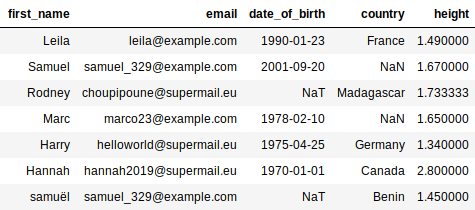
date_of_birth columncontains character strings. We convert them to dates, specifying the date format. Character strings that do not conform to this format will be converted inpd.NaT(this is the case for Rodney’s date of birth).
Line 9 displays the final result:
Take It Further: List Comprehension
List comprehension is a very practical syntax, because it can be used to write a loop that creates a list, in one line. For example, line 3 of the last bit of code above is equivalent to 4 lines (lines 3 to 6):
data = pd.read_csv('persons.csv')

new_column = []
for t in data['height']:
    new_column.append(convert_height(t))
data['height'] = new_column
Would could very well have used apply :
data = pd.read_csv('persons.csv')

data['height'] = data['height'].apply(convert_height)
Take It Further: Processing heights
Let’s go back to the function we left behind:
def convert_height(height):
    found = re.search('\d\.\d{2}m', height)
    if found is None:
        print('{} is not in the right format. It will be ignored.'.format(height))
        return np.NaN
    else:
        value = height[:-1] # the last character is removed: 'm'
        return float(value)
Normally, Pandas automatically detects whether a column from a CSV file contains numbers or character strings. But here, the Height column contains "m"s (for “meters”). Because “m” is a letter, Pandas considers "1.34 m" to be a character string, not a number! We must therefore convert it ourselves.
So... it’s true that line 2 is hard to understand. It checks to see whether the height is properly formatted, that is, in the form of a number followed by a decimal point, then two numbers, then an "m." Thus, "1.34 m" is correct; "153 cm" is not.
You now hold the keys to understanding the rest of this function. Note that float(value) is used to convert a character string representing a number to... a real number (whose type is “float”)!